Model Relationships
Overview
Database normalization is a process where data is split into different tables and links are created between those tables, in order to increase flexibility, reduce data redundancy, and improve data integrity. Relationships are defined in the initialize method of each model.
The following types of relationships are available:
one to one
hasOne(
    string|array $fields,
    string $referenceModel,
    string|array $referencedFields,
    array $options = null
)

hasOneThrough(
    string|array $fields,
    string $intermediateModel,
    string|array $intermediateFields,
    string|array $intermediateReferencedFields,
    string $referenceModel,
    string|array $referencedFields,
    array $options = null
)
one to many
hasMany(
    string|array $fields,
    string $referenceModel,
    string|array $referencedFields,
    array $options = null
)
many to one
belongsTo(
    string|array $fields,
    string $referenceModel,
    string|array $referencedFields,
    array $options = null
)
many to many
hasManyToMany(
    string|array $fields,
    string $intermediateModel,
    string|array $intermediateFields,
    string|array $intermediateReferencedFields,
    string $referenceModel,
    string|array $referencedFields,
    array $options = null
)
Relationships can be unidirectional or bidirectional, and each can be simple (a one-to-one model) or more complex (a combination of models). The model manager manages foreign key constraints for these relationships, the definition of these helps referential integrity as well as fast access of related records to a model. Through the implementation of relations, it is straightforward to access data in related models from the source model in a uniform way.
<?php

namespace MyApp\Models;

use Phalcon\Mvc\Model;

class Invoices extends Model
{
    public function initialize()
    {
        $this->hasOne(
            'inv_cst_id',
            Customers::class,
            'cst_id',
            [
                'alias'    => 'customers',
                'reusable' => true,
            ]
        );
    }
}
Unidirectional
Unidirectional relations are those that are generated in relation to one another but not vice versa.
Bidirectional
The bidirectional relations build relationships in both models and each model defines the inverse relationship of the other.
Setup
In Phalcon, relationships must be defined in the initialize() method of a model. The methods belongsTo(), hasMany(), hasManyToMany(), hasOne(), and hasOneThrough(), define the relationship between one or more fields from the current model to fields in another model. Each of these methods requires 3 parameters:
- local fields
- referenced model
- referenced fields
| Method | Description |
|---|---|
belongsTo |
Defines a n-1 relationship |
hasMany |
Defines a 1-n relationship |
hasManyToMany |
Defines a n-n relationship |
hasOne |
Defines a 1-1 relationship |
hasOneThrough |
Defines a 1-1 relationship |
The following schema shows 3 tables whose relations will serve us as an example regarding relationships:
create table co_invoices
(
    inv_id          int(10) auto_increment  primary key,
    inv_cst_id      int(10)      null,
    inv_status_flag tinyint(1)   null,
    inv_title       varchar(100) null,
    inv_total       float(10, 2) null,
    inv_created_at  datetime     null
);

create table co_invoices_x_products
(
    ixp_inv_id      int(10),
    inv_prd_id      int(10)
);

create table co_products
(
    prd_id          int(10) auto_increment  primary key,
    prd_title       varchar(100) null,
    prd_price       float(10, 2) null
);
- The model
Invoiceshas manyInvoicesProducts. - The model
Productshas manyInvoicesProducts. - The model
InvoicesProductsbelongs to bothInvoicesandProductsmodels as a many-to-one relation. - The model
Invoiceshas a relation many-to-many toProductsthroughInvoicesProducts.
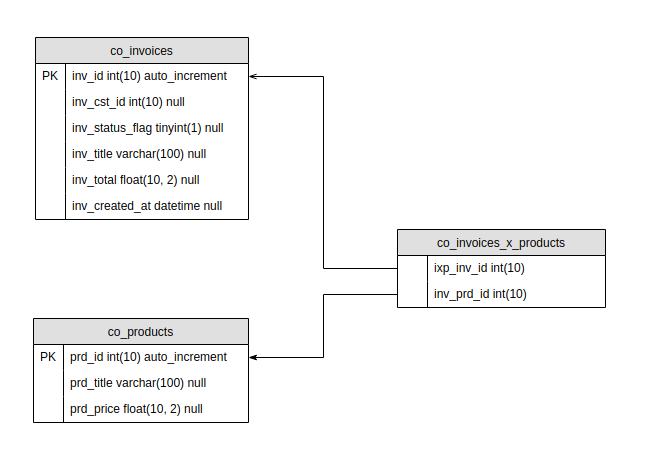
The models with their relations could be implemented as follows:
<?php

namespace MyApp\Models;

use Phalcon\Mvc\Model;

class Invoices extends Model
{
    public $inv_id;
    public $inv_cst_id;
    public $inv_status_flag;
    public $inv_title;
    public $inv_total;
    public $inv_created_at;

    public function initialize()
    {
        $this->hasManyToMany(
            'inv_id',
            InvoicesProducts::class,
            'ixp_inv_id',
            'ixp_prd_id',
            Products::class,
            'prd_id',
            [
                'reusable' => true,
                'alias'    => 'products',
            ]
        );

        $this->hasMany(
            'inv_id',
            InvoicesProducts::class,
            'ixp_inv_id',
            [
                'reusable' => true,
                'alias'    => 'invoicesProducts'
            ]
        );
    }
}
<?php

namespace MyApp\Models;

use Phalcon\Mvc\Model;

class InvoicesProducts extends Model
{
    public $ixp_inv_id;
    public $ixp_prd_id;

    public function initialize()
    {
        $this->belongsTo(
            'ixp_inv_id',
            Invoices::class,
            'inv_id',
            [
                'reusable' => true,
                'alias'    => 'invoice'
            ]
        );

        $this->belongsTo(
            'ixp_prd_id',
            Products::class,
            'prd_id',
            [
                'reusable' => true,
                'alias'    => 'product'
            ]
        );
    }
}
<?php

namespace MyApp\Models;

use Phalcon\Mvc\Model;

class Products extends Model
{
    public $prd_id;
    public $prd_title;
    public $prd_price;
    public $prd_created_at;

    public function initialize()
    {
        $this->hasMany(
            'prd_id',
            InvoicesProducts::class,
            'ixp_prd_id'
        );

        // Many to many -> Invoices
        $this->hasManyToMany(
            'prd_id',
            InvoicesProducts::class,
            'ixp_prd_id',
            'ixp_inv_id',
            Invoices::class,
            'inv_id',
            [
                'reusable' => true,
                'alias'    => 'invoices',
            ]
        );
    }
}
The first parameter indicates the field of the local model used in the relationship; the second indicates the name of the referenced model, and the third is the field name in the referenced model. You could also use arrays to define multiple fields in the relationship.
Many-to-many relationships require 3 models and define the attributes involved in the relationship:
<?php

namespace MyApp\Models;

use Phalcon\Mvc\Model;

class Invoices extends Model
{
    public $inv_id;
    public $inv_cst_id;
    public $inv_status_flag;
    public $inv_title;
    public $inv_total;
    public $inv_created_at;

    public function initialize()
    {
        $this->hasManyToMany(
            'inv_id',
            InvoicesProducts::class,
            'ixp_inv_id',
            'ixp_prd_id',
            Products::class,
            'prd_id',
            [
                'reusable' => true,
                'alias'    => 'products',
            ]
        );
    }
}
Parameters
Depending on the needs of our application we might want to store data in one table, that describes different behaviors. For instance, you might want to only have a table called co_customers which has a field cst_status_flag describing the status of the customer (e.g. active, inactive, etc.).
Using relationships, you can get only those Customers that relate to our Invoices that have a certain cst_status_flag. Defining that constraint in the relationship allows you to let the model do all the work.
It also accepts a closure, which is evaluated every time before the related records are accessed. This enables the conditions to be automatically updated between queries.
<?php

namespace MyApp\Models;

use Phalcon\Mvc\Model;

class Invoices extends Model
{
    public $inv_id;
    public $inv_cst_id;
    public $inv_status_flag;
    public $inv_title;
    public $inv_total;
    public $inv_created_at;

    public function initialize()
    {
        $this->hasMany(
            'inv_cst_id',
            Customers::class,
            'cst_id',
            [
                'reusable' => true,
                'alias'    => 'customersActive',
                'params'   => [
                    'conditions' => 'cst_status_flag = :status:',
                    'bind'       => [
                        'status' => 1,
                     ]
                ]
            ]
        );

        $container = $this->getDI();

        $this->hasMany(
            'inv_cst_id',
            Customers::class,
            'cst_id',
            [
                'reusable' => true,
                'alias'    => 'customersNearby',
                'params'   => function() use ($container) {
                    return [
                        'conditions' => 'cst_location = :location:',
                        'bind'       => [
                            'location' => $container->getShared('myLocationService')->myLocation,
                         ]
                    ];
                }
            ]
        );
    }
}
Multiple Fields
There are times when relationships need to be defined on a combination of fields and not only one. Consider the following example:
<?php

namespace MyApp\Models;

use Phalcon\Mvc\Model;

class Products extends Model
{
    public $prd_id;
    public $prd_type_flag;
    public $prd_name;
}
and
<?php

namespace MyApp\Models;

use Phalcon\Mvc\Model;

class Parts extends Model
{
    public $par_id;
    public $par_prd_id;
    public $par_par_id;
    public $par_type_flag;
    public $par_name;
}
In the above, we have a Products model which has prd_id, prd_type_flag, and prd_name fields. The Parts model contains par_id, par_prd_id, par_type_flag, and par_name. The relationship exists based on the product's unique id as well as the type.
Using the relationship options, as seen above, binding one field between the two models will not return the results we need. We can use an array with the necessary fields to define the relationship.
<?php

namespace MyApp\Models;

use Phalcon\Mvc\Model;

class Products extends Model
{
    public $prd_id;
    public $prd_type_flag;
    public $prd_name;

    public function initialize()
    {
        $this->hasOne(
            [
                'prd_id',
                'prd_type_flag'
            ],
            Parts::class,
            [
                'par_prd_id',
                'par_type_flag'
            ],
            [
                'reusable' => true, // cache
                'alias'    => 'parts',
            ]
        );
    }
}
NOTE
The field mappings in the relationship are one for one i.e. the first field of the source model array matches the first field of the target array etc. The field count must be identical in both source and target models.
Reusable Cache Key Override
When a relation is marked 'reusable' => true, the Model Manager memoises the resolved related record so that repeated traversals of the same association inside one request return the cached object. By default, the cache key is derived from object identity, which means two PHP instances representing the same row do not share the entry.
A model can supply a stable key by implementing Phalcon\Contracts\Mvc\Model\Relation\CacheKeyProvider:
<?php

use Phalcon\Contracts\Mvc\Model\Relation\CacheKeyProvider;
use Phalcon\Mvc\Model;

class Customers extends Model implements CacheKeyProvider
{
    public function getUniqueKey(): string
    {
        return 'customer:' . $this->cst_id;
    }
}
The return value of getUniqueKey() replaces the object-identity key when looking up the reusable cache, so different PHP instances of the same logical row will hit the same entry. See Caching for further details.
Accessing
There are several ways that we can access the relationships of a model.
- Magic
__get,__set - Magic
get* getRelated
__get()
You can use the magic method to access the relationship. Assigning an alias to the relationship simplifies accessing the related data. The name of the property is the same as the one defined in the alias.
<?php

$customer = Customers::findFirst(
    [
        'conditions' => 'cst_id = :customerId:',
        'bind'       => [
            'customerId' => 1,
        ],
    ]
);

foreach ($customer->invoices as $invoice) {
    echo $invoice->inv_title;
}
or for a many-to-many relationship (see models above):
<?php

$invoice = Invoices::findFirst(
    [
        'conditions' => 'inv_cst_id = :customerId:',
        'bind'       => [
            'customerId' => 1,
        ],
    ]
);

foreach ($invoice->invoicesProducts as $product) {
    echo $invoice->product->prd_name;
}

foreach ($invoice->products as $product) {
    echo $invoice->prd_name;
}
Using the magic __get allows you to access the relationship directly but does not offer additional functionality such as filtering or ordering on the relationship.
get*()
You can access the same relationship by using a getter method, starting with get and using the name of the relationship.
<?php

$customer = Customers::findFirst(
    [
        'conditions' => 'cst_id = :customerId:',
        'bind'       => [
            'customerId' => 1,
        ],
    ]
);

foreach ($customer->getInvoices() as $invoice) {
    echo $invoice->inv_title;
}
or for a many-to-many relationship (see models above):
<?php

$invoice = Invoices::findFirst(
    [
        'conditions' => 'inv_cst_id = :customerId:',
        'bind'       => [
            'customerId' => 1,
        ],
    ]
);

foreach ($invoice->getInvoiceProducts() as $product) {
    echo $invoice->product->prd_name;
}

foreach ($invoice->getProducts() as $product) {
    echo $invoice->prd_name;
}
This magic-getter also allows us to perform certain operations when accessing the relationship such as ordering the relationship:
<?php

$invoice = Invoices::findFirst(
    [
        'conditions' => 'inv_cst_id = :customerId:',
        'bind'       => [
            'customerId' => 1,
        ],
    ]
);

$products = $invoice->getProducts(
    [
        'order' => 'prd_name',
    ]
);
foreach ($products as $product) {
    echo $invoice->prd_name;
}
You can also add additional conditionals to the relationship:
<?php

$invoice = Invoices::findFirst(
    [
        'conditions' => 'inv_cst_id = :customerId:',
        'bind'       => [
            'customerId' => 1,
        ],
    ]
);

$products = $invoice->getProducts(
    [
        'prd_created_at = :date:',
        'bind' => [
            'date' => '2019-12-25',
        ],
    ]
);

foreach ($products as $product) {
    echo $invoice->prd_name;
}
To get the same records manually:
<?php

$invoice = Invoices::findFirst(
    [
        'conditions' => 'inv_cst_id = :customerId:',
        'bind'       => [
            'customerId' => 1,
        ],
    ]
);


$invoicesProducts = InvoicesProducts::find(
    [
        'conditions' => 'ixp_inv_id = :invoiceId:',
        'bind'       => [
            'invoiceId' => $invoice->inv_id,
        ],
    ]
);

$productIds = [];
foreach ($invoicesProducts as $intermediate) {
    $productIds[] = $intermediate->ixp_prd_id;
}

$products = Products::find(
    [
        'conditions' => 'prd_id IN ({array:productIds})',
        'bind'       => [
            'productIds' => $productIds,
        ],
    ]
);

foreach ($products as $product) {
    echo $invoice->prd_name;
}
The prefix get is used to find()/findFirst() related records.
| Type | Implicit Method | Returns |
|---|---|---|
| Belongs-To | findFirst |
Model instance of the related record directly |
| Has-One | findFirst |
Model instance of the related record directly |
| Has-One-Through | findFirst |
Model instance of the related record directly |
| Has-Many | find |
Collection of model instances of the referenced model |
| Has-Many-to-Many | (complex query) | Collection of model instances of the referenced model (inner join) |
You can also use the count prefix to return an integer denoting the count of the related records:
<?php

$invoice = Invoices::findFirst(
    [
        'conditions' => 'inv_cst_id = :customerId:',
        'bind'       => [
            'customerId' => 1,
        ],
    ]
);

echo $invoice->countProducts();
getRelated()
You can access the same relationship by using getRelated() and defining which relationship you want to get.
<?php

$customer = Customers::findFirst(
    [
        'conditions' => 'cst_id = :customerId:',
        'bind'       => [
            'customerId' => 1,
        ],
    ]
);

foreach ($customer->getRelated('invoices') as $invoice) {
    echo $invoice->inv_title;
}
or for a many-to-many relationship (see models above):
<?php

$invoice = Invoices::findFirst(
    [
        'conditions' => 'inv_cst_id = :customerId:',
        'bind'       => [
            'customerId' => 1,
        ],
    ]
);

foreach ($invoice->getRelated('products') as $product) {
    echo $invoice->prd_name;
}
The second parameter of getRelated() is an array that offers additional options to be set such as filtering and ordering.
<?php

$invoice = Invoices::findFirst(
    [
        'conditions' => 'inv_cst_id = :customerId:',
        'bind'       => [
            'customerId' => 1,
        ],
    ]
);

$products = $invoice->getRelated(
    'products',
    [
        'prd_created_at = :date:',
        'bind' => [
            'date' => '2019-12-25',
        ],
    ]
);

foreach ($products as $product) {
    echo $invoice->prd_name;
}
setRelated()
setRelated() is the counterpart of getRelated(). It stores records in the relation cache, so that a later read of that relation returns them without querying the database.
The alias is the relation name and is not case sensitive. The records can be a model, a resultset, or null for a to-one relation with no match. The model is returned, so calls can be chained.
<?php

use MyApp\Models\Customers;
use MyApp\Models\Invoices;

$customer = Customers::findFirst(
    [
        'conditions' => 'cst_id = :customerId:',
        'bind'       => [
            'customerId' => 1,
        ],
    ]
);

$invoices = Invoices::find('inv_cst_id = 1');

$customer->setRelated('invoices', $invoices);

// answered from the cache, no query
$customer->getRelated('invoices');
After the call, isRelationshipLoaded() reports the relation as loaded:
<?php

use MyApp\Models\Customers;

$customer = Customers::findFirst('cst_id = 1');

$customer->isRelationshipLoaded('invoices'); // false

$customer->setRelated('invoices', []);

$customer->isRelationshipLoaded('invoices'); // true
WARNING
setRelated() populates the read cache only. It does not mark the record as having unsaved related records, so a following save() will not persist them.
To save a record together with its related records, assign them as a magic property instead. That path stages the records and save() writes them:
<?php

use MyApp\Models\Customers;
use MyApp\Models\Invoices;

$customer = Customers::findFirst('cst_id = 1');

$invoice = new Invoices();

$invoice->inv_title = 'Invoice for ACME Inc.';
$invoice->inv_total = 100;

$customer->invoices = [$invoice];

$customer->save();
See Save for the full description of that behavior.
setRelated() is the same mechanism Eager Loading uses to attach pre-loaded records to each returned model.
Aliases
Accessing a relationship can be achieved by using the name of the remote table. Due to naming conventions, this might not be that clear and could lead to confusion. As seen above, you can define an alias to the relationship.
<?php

namespace MyApp\Models;

use Phalcon\Mvc\Model;

class Invoices extends Model
{
    public $inv_id;
    public $inv_cst_id;
    public $inv_status_flag;
    public $inv_title;
    public $inv_total;
    public $inv_created_at;

    public function initialize()
    {
        $this->hasManyToMany(
            'inv_id',
            InvoicesProducts::class,
            'ixp_inv_id',
            'ixp_prd_id',
            Products::class,
            'prd_id'
        );
    }
}
With an alias:
<?php

namespace MyApp\Models;

use Phalcon\Mvc\Model;

class Invoices extends Model
{
    public $inv_id;
    public $inv_cst_id;
    public $inv_status_flag;
    public $inv_title;
    public $inv_total;
    public $inv_created_at;

    public function initialize()
    {
        $this->hasManyToMany(
            'inv_id',
            InvoicesProducts::class,
            'ixp_inv_id',
            'ixp_prd_id',
            Products::class,
            'prd_id',
            [
                'reusable' => true,
                'alias'    => 'products',
            ]
        );
    }
}
If your table structure has self-joins, you will not be able to access those relationships without aliases because you will be using the same model.
<?php

namespace MyApp\Models;

use Phalcon\Mvc\Model;

class Parts extends Model
{
    public $par_id;
    public $par_prd_id;
    public $par_par_id;
    public $par_type_flag;
    public $par_name;

    public function initialize()
    {
        $this->hasMany(
            'par_id',
            Parts::class,
            'par_par_id',
            [
                'reusable' => true,
                'alias'    => 'children',
            ]
        );

        $this->belongsTo(
            'par_par_id',
            Parts::class,
            'par_id',
            [
                'reusable' => true,
                'alias'    => 'parent',
            ]
        );
    }
}
In the example above, we have a Part that has a relationship with one or more Part objects. Each Part can consist of other parts that construct it. As a result, we end up with a self-join relationship. For a telephone Part we have the following children:
<?php

$phone = Parts::findFirst(....);

echo $phone->getChildren();

// --- Cover
// --- Battery
// --- Charger
and each of those parts has the telephone as a parent:
Caching
Accessing related data can significantly increase the number of queries in your database. You can reduce this load as much as possible, by utilizing the reusable option in your relationship. Setting this option to true will instruct Phalcon to cache the results of the relationship the first time it is accessed, so that subsequent calls to the same relationship can use the cached resultset and not request the data again from the database. This cache is active during the same request.
NOTE
You are encouraged to use the reusable option as often as possible in your relationships
<?php

namespace MyApp\Models;

use Phalcon\Mvc\Model;

class Invoices extends Model
{
    public function initialize()
    {
        $this->hasOne(
            'inv_cst_id',
            Customers::class,
            'cst_id',
            [
                'alias'    => 'customers',
                'reusable' => true,
            ]
        );
    }
}
Eager Loading
Eager loading pre-loads a relation for every record in a resultset, using one query for the whole set instead of one query per record.
Accessing a relation inside a loop issues a query on each iteration. Reading 500 invoices and their customers costs 501 queries:
<?php

use MyApp\Models\Invoices;

$invoices = Invoices::find('inv_total > 100');

foreach ($invoices as $invoice) {
    echo $invoice->customer->cst_name_last;
}
The reusable option described above does not solve this. It collapses repeated access to the same key, but it never combines different keys into a single query.
Pass the eager parameter to find() to load the relation for the whole resultset at once. The cost becomes two queries, and stays at two no matter how many invoices are returned:
<?php

use MyApp\Models\Invoices;

$invoices = Invoices::find(
    [
        'conditions' => 'inv_total > :total:',
        'bind'       => [
            'total' => 100,
        ],
        'eager'      => ['customer'],
    ]
);

foreach ($invoices as $invoice) {
    echo $invoice->customer->cst_name_last;
}
The records are loaded into the same cache that getRelated() reads, so $invoice->customer, $invoice->getCustomer() and $invoice->getRelated('customer') all return the pre-loaded record without querying.
The value of eager is always an array. A string throws Phalcon\Mvc\Model\Exceptions\InvalidEagerParameter.
Supported Relations
belongsTo,hasOneandhasManycost one query eachhasOneThroughandhasManyToManycost two queries each - one for the intermediate table, one for the referenced records- Composite keys are supported for all relation types
Through-relations are loaded without a join, so parent records are never multiplied and the result is identical to the lazy path.
A to-one relation with no matching record resolves to null. A to-many relation with no matching records resolves to an empty resultset, so it can be iterated without a guard.
Nested Relations
Relations of relations are loaded with a dot-delimited path:
<?php

use MyApp\Models\Invoices;

$invoices = Invoices::find(
    [
        'eager' => ['customer.country'],
    ]
);

foreach ($invoices as $invoice) {
    echo $invoice->customer->country->cnt_name;
}
A path implies each of its prefixes, and prefixes are merged. Both of the following cost the same two queries - one for customers, one for countries:
The number of queries follows the number of distinct relations named, not the number of paths supplied. Loading ['customer.country', 'customer.address'] costs three queries: customers are fetched once and shared by both branches.
Paths are limited to five segments. A longer path throws Phalcon\Mvc\Model\Exceptions\InvalidEagerPath, as does an empty segment such as customer..country.
Relation Options
An element can be written as path => options to narrow what the relation loads. The accepted options are columns, conditions, bind, bindTypes and order.
<?php

use MyApp\Models\Customers;

$customers = Customers::find(
    [
        'eager' => [
            'invoices' => [
                'conditions' => 'inv_status_flag = :status:',
                'bind'       => [
                    'status' => 1,
                ],
                'order'      => 'inv_created_at DESC',
            ],
        ],
    ]
);
Conditions declared on the relation itself - the params option of hasMany(), belongsTo() and the rest - are always applied, whether or not the relation is loaded eagerly. When both are present the two are combined with AND; the relation's own conditions are not replaced.
limit and offset are rejected with Phalcon\Mvc\Model\Exceptions\UnsupportedEagerOption. A limit applied to a single query for the whole set would return that many records in total rather than that many per parent, which is not what the option would appear to mean.
Selecting Columns
Restricting a relation to a subset of columns returns Phalcon\Mvc\Model\Row objects for that relation, exactly as columns does on find():
<?php

use MyApp\Models\Invoices;

$invoices = Invoices::find(
    [
        'eager' => [
            'customer' => [
                'columns' => 'cst_id, cst_name_last',
            ],
        ],
    ]
);

foreach ($invoices as $invoice) {
    // $invoice is a model; $invoice->customer is a Row
    echo $invoice->customer->cst_name_last;
}
A Row carries only the selected columns. It is not a model, so it has no save(), no snapshots and none of the methods defined on the related model.
The relation's referenced field must appear in the column list, because the returned records are matched back to their parents by that field. Omitting it throws Phalcon\Mvc\Model\Exceptions\MissingEagerKeyColumn. The same applies to the local field when the parent query itself uses columns.
Hydration
Eager loading requires the default hydration mode, Resultset::HYDRATE_RECORDS. Arrays and standard objects have no relation cache to populate, so combining eager with HYDRATE_ARRAYS or HYDRATE_OBJECTS throws Phalcon\Mvc\Model\Exceptions\UnsupportedEagerHydration.
Criteria
The same parameter is available on the criteria returned by query():
<?php

use MyApp\Models\Invoices;

$invoices = Invoices::query()
    ->eager(['customer'])
    ->where('inv_total > 100')
    ->execute();
Phalcon\Mvc\Model\Criteria::eager() records the paths and execute() forwards them to find(), so the behavior is identical.
eager() is defined on Phalcon\Mvc\Model\Criteria and not on Phalcon\Mvc\Model\CriteriaInterface, because adding a method to the interface would break every existing implementation of it. Phalcon\Mvc\Model::query() declares CriteriaInterface as its return type, so a static analyzer reports the call as undefined even though it resolves at runtime. Call eager() first, as above, and annotate the variable if your analysis requires it:
<?php

use MyApp\Models\Invoices;
use Phalcon\Mvc\Model\Criteria;

/** @var Criteria $criteria */
$criteria = Invoices::query();

$invoices = $criteria
    ->eager(['customer'])
    ->where('inv_total > 100')
    ->execute();
Errors
An unknown relation alias is reported before any query runs, with Phalcon\Mvc\Model\Exceptions\UnknownEagerRelation naming the model and the alias. Every other failure listed above is also raised as an exception rather than silently loading nothing, so a mistake in the specification is visible immediately.
Autocompletion
Most IDEs and editors with auto-completion capabilities can not detect the correct types when using magic getters (both methods and properties). To address this issue, you can use the class docblock that specifies what magic actions are available, helping the IDE to produce a better auto-completion:
<?php

namespace MyApp\Models;

use Phalcon\Mvc\Model;

/**
 * Invoices model
 *
 * @property Simple|Products[] $products
 * @method   Simple|Products[] getProducts($parameters = null)
 * @method   integer           countProducts()
 */
class Invoices extends Model
{
    public $inv_id;
    public $inv_cst_id;
    public $inv_status_flag;
    public $inv_title;
    public $inv_total;
    public $inv_created_at;

    public function initialize()
    {
        $this->hasManyToMany(
            'inv_id',
            InvoicesProducts::class,
            'ixp_inv_id',
            'ixp_prd_id',
            Products::class,
            'prd_id',
            [
                'reusable' => true,
                'alias'    => 'products',
            ]
        );
    }
}
Conditionals
You can also create relationships based on conditionals. When querying based on the relationship the condition will be automatically appended to the query:
<?php

namespace MyApp\Models;

use Phalcon\Mvc\Model;

class Invoices extends Model
{
    public $inv_id;
    public $inv_cst_id;
    public $inv_status_flag;
    public $inv_title;
    public $inv_total;
    public $inv_created_at;

    public function initialize()
    {
        $this->hasManyToMany(
            'inv_id',
            InvoicesProducts::class,
            'ixp_inv_id',
            'ixp_prd_id',
            Products::class,
            'prd_id',
            [
                'reusable' => true,
                'alias'    => 'products',
            ]
        );
    }
}

class Companies extends Model
{
    public function initialize()
    {
        $this->hasMany(
            'id',
            Invoices::class,
            'inv_id',
            [
                'alias' => 'Invoices',
            ]
        );

        $this->hasMany(
            'id',
            Invoices::class,
            'inv_id',
            [
                'alias'  => 'InvoicesPaid',
                'params' => [
                    'conditions' => "inv_status = 'paid'",
                ],
            ]
        );

        $this->hasMany(
            'id',
            Invoices::class,
            'inv_id',
            [
                'alias'  => 'InvoicesUnpaid',
                'params' => [
                    'conditions' => "inv_status <> :status:",
                    'bind'       => [
                        'status' => 'unpaid',
                    ],
                ],
            ]
        );
    }
}
Additionally, you can use the parameters of getInvoices() or getRelated() on the model, to further filter or order your relationship:
<?php

$company = Companies::findFirst(
    [
        'conditions' => 'id = :id:',
        'bind'       => [
            'id' => 1,
        ],
    ]
);
*
$unpaidInvoices = $company->InvoicesUnpaid;
$unpaidInvoices = $company->getInvoicesUnpaid();
$unpaidInvoices = $company->getRelated('InvoicesUnpaid');
$unpaidInvoices = $company->getRelated(
    'Invoices',
    [
        'conditions' => "inv_status = 'paid'",
    ]
);

$unpaidInvoices = $company->getRelated(
    'Invoices',
    [
        'conditions' => "inv_status = 'paid'",
        'order'      => 'inv_created_date ASC',
    ]
);
Virtual Foreign Keys
By default, relationships do not have any constraints attached to them, to check related data when adding, updating, or deleting records. You can however attach validations to your relationships, to ensure the integrity of data. This can be done with the last parameter of the relationship-related method.
The cross table InvoicesProducts can be slightly changed to demonstrate this functionality:
<?php

namespace MyApp\Models;

use Phalcon\Mvc\Model;

class InvoicesProducts extends Model
{
    public $ixp_inv_id;
    public $ixp_prd_id;

    public function initialize()
    {
        $this->belongsTo(
            'ixp_inv_id',
            Invoices::class,
            'inv_id',
            [
                'alias'      => 'invoice',
                'foreignKey' => true,
                'reusable'   => true,
            ]
        );

        $this->belongsTo(
            'ixp_prd_id',
            Products::class,
            'prd_id',
            [
                'alias'      => 'product',
                'foreignKey' => [
                    'message' => 'The prd_id does not exist ' .
                                 'in the Products model',
                ],
                'reusable'   => true,
            ]
        );
    }
}
If you alter a belongsTo() relationship to act as foreign key, it will validate that the values inserted/updated on those fields have reference valid ids in the respective models. Similarly, if a hasMany()/hasOne() is changed to define the foreignKey, it will validate that records can or cannot if the record has related data.
<?php

namespace MyApp\Models;

use Phalcon\Mvc\Model;

class Products extends Model
{
    public $prd_id;
    public $prd_title;
    public $prd_price;
    public $prd_created_at;

    public function initialize()
    {
        $this->hasMany(
            'prd_id',
            Products::class,
            'ixp_prd_id',
            [
                'foreignKey' => [
                    'message' => 'The product cannot be deleted ' .
                                 'because there are invoices ' .
                                 'attached to it',
                ],
            ]
        );
    }
}
A virtual foreign key can be set up to allow null values as follows:
<?php

namespace MyApp\Models;

use Phalcon\Mvc\Model;

class InvoicesProducts extends Model
{
    public $ixp_inv_id;
    public $ixp_prd_id;

    public function initialize()
    {
        $this->belongsTo(
            'ixp_inv_id',
            Invoices::class,
            'inv_id',
            [
                'alias'      => 'invoice',
                'foreignKey' => true,
                'reusable'   => true,
            ]
        );

        $this->belongsTo(
            'ixp_prd_id',
            Products::class,
            'prd_id',
            [
                'alias'      => 'product',
                'foreignKey' => [
                    'allowNulls' => true,
                    'message'    => 'The prd_id does not exist ' .
                                    'in the Products model',
                ],
                'reusable'   => true,
            ]
        );
    }
}
Cascade/Restrict
Relationships that act as virtual foreign keys by default restrict the creation/update/deletion of records to maintain the integrity of data. You can define these constraints that mimic the RDBMS functionality for CASCADE and RESTRICT by using the action option in foreignKey. The Phalcon\Mvc\Model\Relation underlying object offers two constants:
Relation::ACTION_CASCADERelation::ACTION_RESTRICT
<?php

namespace MyApp\Models;

use Phalcon\Mvc\Model;
use Phalcon\Mvc\Model\Relation;

class Products extends Model
{
    public $prd_id;
    public $prd_title;
    public $prd_price;
    public $prd_created_at;

    public function initialize()
    {
        $this->hasMany(
            'prd_id',
            Products::class,
            'ixp_prd_id',
            [
                'foreignKey' => [
                    'action' => Relation::ACTION_CASCADE,
                ],
            ]
        );
    }
}
The code above allows you to delete all the related records if the primary record is deleted (cascade delete).
Operations
You can perform operations using relationships if a resultset returns complete objects.
Save
Magic properties can be used to store a record and its related properties:
<?php

$artist = new Artists();

$artist->name    = 'Shinichi Osawa';
$artist->country = 'Japan';

$album = new Albums();

$album->name   = 'The One';
$album->artist = $artist;
$album->year   = 2008;

$album->save();
Saving a record and its related records in a has-many relation:
<?php

$customer = Customers::findFirst(
    [
        'conditions' => 'cst_id = :customerId:',
        'bind'       => [
            'customerId' => 1,
        ]
    ]
);

$invoice1 = new Invoices();
$invoice1-> inv_status_flag = 0;
$invoice1-> inv_title       = 'Invoice for ACME Inc. #1';
$invoice1-> inv_total       = 100;
$invoice1-> inv_created_at  = time();

$invoice2 = new Invoices();
$invoice2-> inv_status_flag = 0;
$invoice2-> inv_title       = 'Invoice for ACME Inc. #2';
$invoice2-> inv_total       = 200;
$invoice2-> inv_created_at  = time();


$customer->invoices = [
    $invoice1,
    $invoice2
];


$customer->save();
The code above gets a customer from our database. Two invoices are created and assigned to the invoices relationship of the customer as an array. The customer record is then saved, which also saves the two invoices in the database and links them to the customer.
Although the syntax above is very handy, it is not always ideal to use it, especially when updating related records. Phalcon does not know which records need to be added or removed using an update, and as a result, it will perform a replacement. In update situations, it is better to control the data yourself vs. leaving it to the framework to do that.
Saving data with the above syntax will implicitly create a transaction and commit it if all goes well. Messages generated during the save process of the whole transaction will be passed back to the user for more information.
WARNING
Adding related entities by overloading the following methods/events is not possible:
Phalcon\Mvc\Model::beforeSave()Phalcon\Mvc\Model::beforeCreate()Phalcon\Mvc\Model::beforeUpdate()
You need to overload Phalcon\Mvc\Model::save() for this to work from within a model.
Synchronizing Many-to-Many Records
Assigning an array to a many-to-many relationship and calling save() is additive by default. Records in the array are inserted or kept. Records that were linked before but are absent from the array stay linked. Synchronization changes this: the assigned array becomes the complete set of related records. Links missing from the array are deleted, new links are created, and existing links are kept.
- Synchronization applies to
hasManyToMany()relationships only. - It operates on the intermediate (pivot) table and behaves identically on MySQL, PostgreSQL, and SQLite.
- The default additive behavior is unchanged unless you opt in.
Enable it on the relationship definition with the sync option. Every save of that relationship then synchronizes.
<?php

namespace MyApp\Models;

use Phalcon\Mvc\Model;

class Invoices extends Model
{
    public $inv_id;
    public $inv_cst_id;
    public $inv_status_flag;
    public $inv_title;
    public $inv_total;
    public $inv_created_at;

    public function initialize()
    {
        $this->hasManyToMany(
            'inv_id',
            InvoicesProducts::class,
            'ixp_inv_id',
            'ixp_prd_id',
            Products::class,
            'prd_id',
            [
                'alias' => 'products',
                'sync'  => true,
            ]
        );
    }
}
With the option enabled, the assigned array is authoritative on every save:
<?php

$invoice = Invoices::findFirst(1);

// Link invoice 1 to product 1 and product 2
$invoice->products = [$product1, $product2];
$invoice->save();

// product2 is dropped from the array
$invoice->products = [$product1, $product3];
$invoice->save();

// invoice 1 is now linked to product 1 and product 3 only.
// The link to product2 is deleted. product2 itself is not deleted.
Assigning an empty array removes every link for that relationship:
<?php

$invoice = Invoices::findFirst(1);

$invoice->products = [];
$invoice->save();

// All intermediate rows for invoice 1 are removed.
To synchronize without changing the relationship definition, use Phalcon\Mvc\Model::setSync(). It enables or disables synchronization for the next save() only, and the flag is cleared once the save completes. The method returns the model instance, so it chains before save().
setSync() accepts:
- no argument or
"*"- every many-to-many relationship on the model - a single alias string - that one relationship
- an array of alias strings - those relationships
- an optional second argument (
bool, defaulttrue) - passfalseto disable synchronization instead of enabling it
A per-save call takes precedence over the relationship's sync option for that save.
<?php

$invoice = Invoices::findFirst(1);

// Synchronize only the "products" relationship on this save
$invoice->products = [$product1];
$invoice->setSync('products')->save();

// Synchronize every many-to-many relationship on this save
$invoice->setSync()->save();

// Synchronize a specific set of relationships on this save
$invoice->setSync(['products', 'categories'])->save();
The second argument disables synchronization for a single save. This keeps a save additive even when the relationship is defined with 'sync' => true:
<?php

$invoice = Invoices::findFirst(1);

// "*" targets every relationship; false keeps this save additive
$invoice->products = [$product1];
$invoice->setSync('*', false)->save();

// Disable synchronization for specific relationships on this save
$invoice->setSync(['products', 'categories'], false)->save();
Synchronization runs inside the same implicit transaction as the rest of the save. If a delete fails, the transaction is rolled back and the messages are available through Phalcon\Mvc\Model::getMessages().
Update
Instead of doing this:
<?php

$invoices = $customer->getInvoices();

foreach ($invoices as $invoice) {
    $invoice->inv_total      = 100;
    $invoice->inv_updated_at = time();

    if (false === $invoice->update()) {
        $messages = $invoice->getMessages();

        foreach ($messages as $message) {
            echo $message;
        }

        break;
    }
}
you can do this:
update also accepts an anonymous function to filter what records must be updated:
<?php

$data = [
    'inv_total'      => 100,
    'inv_updated_at' => time(),
];

$customer->getInvoices()->update(
    $data,
    function ($invoice) {
        return ($invoice->inv_cst_id !== 1);
    }
);
Delete
Instead of doing this:
<?php

$invoices = $customer->getInvoices();

foreach ($invoices as $invoice) {
    if (false === $invoice->delete()) {
        $messages = $invoice->getMessages();

        foreach ($messages as $message) {
            echo $message;
        }

        break;
    }
}
you can do this:
delete() also accepts an anonymous function to filter what records must be deleted:
WARNING
delete() only works safely with hasMany() relationships. The deletion callback runs before the actual deletion of the parent model.
This makes it safe for:
- Deleting child models that hold a foreign key to the parent (e.g., hasMany)
But unsafe for:
- Deleting related models that the parent depends on via a foreign key (e.g., belongsTo or hasOne where FK is in parent)
<?php

$customer->getInvoices()->delete(
    function ($invoice) {
        return ($invoice->inv_total >= 0);
    }
);
Messages
You can append messages from another model.
<?php

$invoices = $customer->getInvoices();

foreach ($invoices as $invoice) {
    if ( false === $invoice->save() ) {
        $customer->appendMessagesFrom($invoice);
    }
}
$messages = $customer->getMessages();
foreach ($messages as $message) {
    echo $message;
    $metaData = $message->getMetadata();
    if ( true === isset($metaData['model']) ) {
        echo $metaData['model'];
    }
}
For better error reporting you can retrieve the name of the Model and Reference Model from the Message MetaData:
<?php

$invoices = $customer->getInvoices();
if ( false === $customer->save() ) {
    $messages = $customer->getMessages();
    foreach ($messages as $message) {
        echo $message;
        $metaData = $message->getMetadata();
        if ( true === isset($metaData['model']) ) {
            echo $metaData['model'];
        }
        if ( true === isset($metaData['referenceModel']) ) {
            echo $metaData['referenceModel'];
        }
    }
}