Tutorial - INVO
Overview
INVO is a sample invoicing application. It lets users manage companies, products, and product types, sign up, and log in. On the client side it uses Bootstrap for the UI. INVO does not generate real invoices. It demonstrates how common tasks are implemented with Phalcon:
- Session authentication (login and signup)
- ACL-based access control (frontend and backend separation)
- CRUD management (companies, products, product types)
- Forms with filters and validators
- Search with a paginator
INVO runs on two Phalcon distributions from the same source tree:
- Phalcon v5 minimum
5.0- the C extension. This is the default when the extension is loaded. - Phalcon v6 currently
6.0alpha - thephalcon/phalconPHP package. No extension is required. - The two are mutually exclusive at runtime. When the v5 extension is loaded, PHP uses it and the v6 package is shadowed.
NOTE
Open the application in your editor to follow this tutorial alongside the source.
NOTE
Note the code below has been formatted to increase readability.
Installation
There are three ways to obtain and run INVO. Pick the one that matches your workflow:
| Method | Best for | Phalcon version installed |
|---|---|---|
Composer (create-project) |
A local PHP host, quickest bootstrap | v6 package (v5 optional via PIE) |
| Docker | A full stack with a MySQL database | v5 extension (v6 via build arg) |
| Local (non-Docker) | Full control over the host environment | v5 extension or v6 package |
Requirements
- PHP 8.2 through 8.5.
- The
opensslandpdoextensions. For MySQL,pdo_mysql. - MySQL 8.0 as the data store.
- Composer.
- For the v5 path, the Phalcon C extension. See the installation page for the full list of platforms and install methods.
Composer (create-project)
This is the shortest path on a local PHP host. Composer downloads the application from Packagist, installs the dependencies, and runs a post-create hook:
The post-create-project-cmd hook copies .env.example to .env if no .env exists, then prints the next steps to the terminal:
INVO is ready (.env created from .env.example). Next steps:
  docker: docker compose up -d --build, then composer migrate
  local:  install the v5 extension via PIE, or run on the bundled phalcon/phalcon (v6) as-is - see the README
  tests:  vendor/bin/talon run
Out of the box the application runs on the bundled phalcon/phalcon (v6) package, so no extension is required. To run on the Phalcon v5 C extension instead, install it with PIE (see the installation page). Once the extension is loaded, PHP prefers it automatically and the bundled v6 package is shadowed. It can stay installed.
After the project is created, edit .env for your database, then create the schema:
Serve the application with the built-in PHP web server:
Docker
The Docker stack requires nothing on the host except Docker itself. No PHP, no extensions, and no database are needed locally. The stack defines two services: the application (app) and a MySQL 8.0 database (mysql).
From the project root:
cp .env.example .env
docker compose up -d --build

# Create the database schema (migrations are not run on boot)
docker compose exec app composer migrate
Then open http://localhost:8080 and log in with the seeded demo account:
| Username | Password |
|---|---|
demo |
phalcon |
NOTE
app is the Compose service name used by docker compose exec. The running container is named ${PROJECT_PREFIX}-app, which is invo-app by default. If you address it with plain docker exec, use the container name, for example docker exec invo-app composer migrate.
Choosing the Phalcon version
The image installs one distribution at a time, selected by the PHALCON_VARIANT build argument. The v5 image compiles the C extension. The v6 image installs the phalcon/phalcon package instead.
docker compose up -d --build                      # v5 (C extension, default)
PHALCON_VARIANT=v6 docker compose up -d --build   # v6 (phalcon/phalcon, alpha)
Choosing the PHP version
The image is built for one PHP version at a time, selected by the PHP_VERSION build argument. The default is 8.5, and 8.2 through 8.5 are supported:
docker compose up -d --build                  # PHP 8.5 (default)
PHP_VERSION=8.2 docker compose up -d --build  # PHP 8.2
The container keeps the same name across rebuilds, so each rebuild replaces the previous one. To run several versions side by side, give each its own Compose project and prefix:
Local (non-Docker)
To run INVO directly on your host:
- Install the Phalcon v5 extension with PIE. To run on v6 instead, skip this step and rely on the bundled
phalcon/phalconpackage. - Install the PHP dependencies with
composer install. - Copy
.env.exampleto.envand pointDB_HOSTat your host (the Docker defaults use themysqlservice name, so a local host uses127.0.0.1). - Create the schema with
composer migrate. - Serve the application with
php -S localhost:8080 -t public .htrouter.php, or set up a virtual host as described on the webserver setup page.
Structure
INVO follows the PDS skeleton layout. The application source lives under src, the views under themes, and all tooling configuration under resources:
invo/
    config
    public
        css
        img
        js
    resources
        docker
        migrations
    src
        Constants
        Controllers
        Forms
        Models
        Plugins
        Providers
    tests
        Browser
        Functional
        Support
        Unit
    themes
        invo
    var
| Directory | Description |
|---|---|
config |
Application configuration (config.php, providers.php) |
public |
Entry point for the application, css, js, images |
resources |
Tooling configuration, Docker, migrations |
resources/docker |
Dockerfile and related build files |
resources/migrations |
Database migrations (phalcon/migrations) |
src |
Where the application lives (controllers, forms, etc.) |
src/Constants |
Application constants |
src/Controllers |
Controllers |
src/Forms |
Forms |
src/Models |
Database models |
src/Plugins |
Plugins (security, not-found) |
src/Providers |
Providers: register services in the DI container |
tests |
PHPUnit suites (unit, functional) |
themes/invo |
Volt views |
var |
Runtime cache and logs |
Phalcon does not impose a directory structure. This layout is INVO's own. The entry point is public/index.php. Set up your web server using the webserver setup page.
Once the application is running, open it in your browser. You will see a screen similar to this:
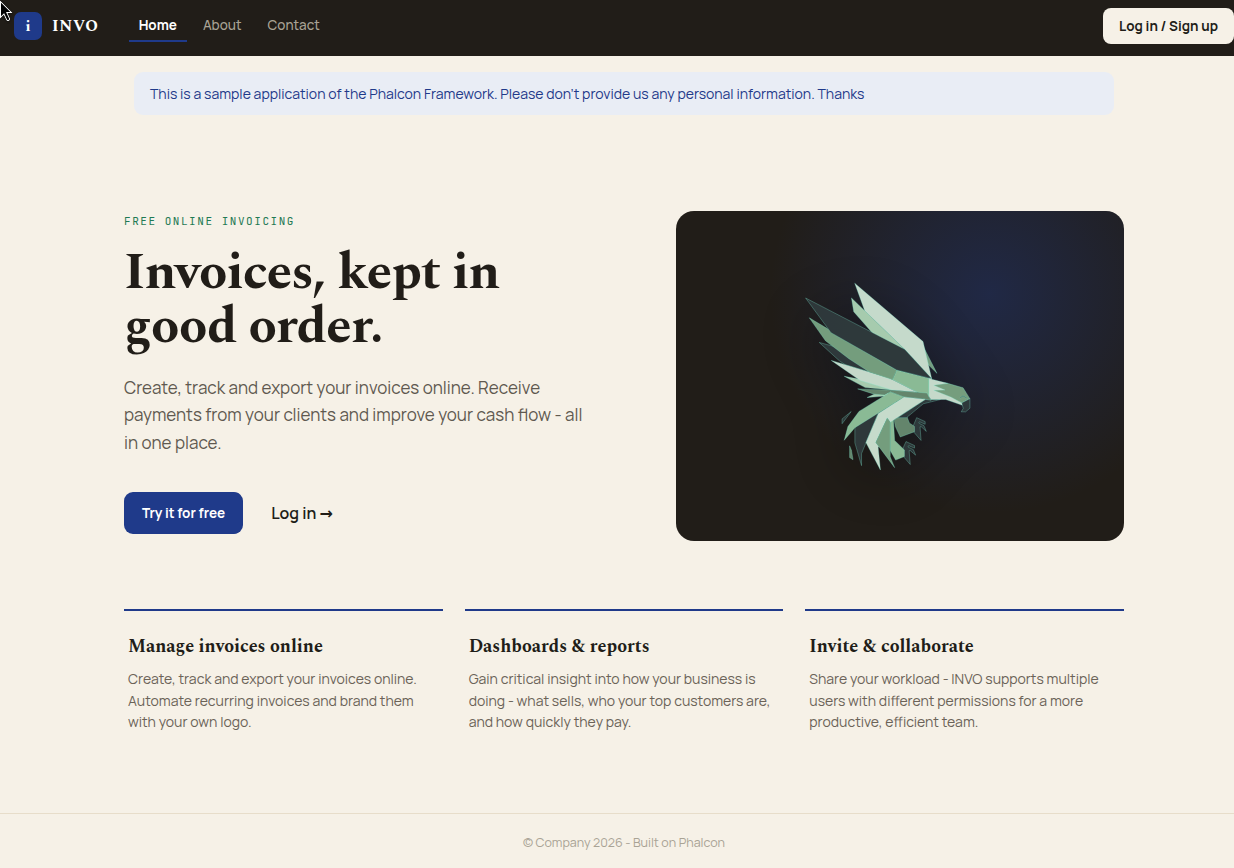
The application is divided into two parts, a frontend and a backend. The frontend is a public area where visitors can read about INVO and request contact information. The backend is an administrative area where registered users manage their products and customers.
Routing
INVO uses the default route built into the Router component. It matches the following pattern:
For example, /session/start executes SessionController and its startAction.
Bootstrapping
Entry
The entry point is public/index.php. It loads the composer autoloader, loads the environment variables from .env with Dotenv, and runs the application:
<?php

declare(strict_types=1);

use Dotenv\Dotenv;
use Invo\Application;

error_reporting(E_ALL);

$rootPath = dirname(__DIR__);

try {
    require_once $rootPath . '/vendor/autoload.php';

    Dotenv::createImmutable($rootPath)->load();

    echo (new Application($rootPath))->run();
} catch (Exception $e) {
    echo $e->getMessage() . '<br>';
    echo '<pre>' . $e->getTraceAsString() . '</pre>';
}
The composer autoloader is configured in composer.json, mapping the Invo namespace to the src folder:
Dotenv::createImmutable($rootPath)->load() reads the .env file in the project root. A .env.example file ships with the application. Copy it to .env and edit it for your environment.
Application
The application logic is wrapped in the Invo\Application class. It creates the DI container, stores the root path in it, creates the MVC application, and registers the providers:
<?php

declare(strict_types=1);

namespace Invo;

use Phalcon\Di\DiInterface;
use Phalcon\Di\FactoryDefault;
use Phalcon\Http\ResponseInterface;
use Phalcon\Mvc\Application as MvcApplication;

class Application
{
    protected MvcApplication $app;
    protected DiInterface $di;
    protected string $rootPath;

    public function __construct(string $rootPath)
    {
        $this->rootPath = $rootPath;

        $this->di = new FactoryDefault();
        $this->di->offsetSet('rootPath', function () use ($rootPath) {
            return $rootPath;
        });

        $this->app = new MvcApplication($this->di);

        $this->initializeProviders();
    }

    public function getRootPath(): string
    {
        return $this->rootPath;
    }

    public function run(): string
    {
        /** @var ResponseInterface $response */
        $response = $this->app->handle($_SERVER['REQUEST_URI']);

        return (string) $response->getContent();
    }

    protected function initializeProviders(): void
    {
        $filename = $this->rootPath . '/config/providers.php';
        if (!file_exists($filename) || !is_readable($filename)) {
            throw new Exception('File providers.php does not exist or is not readable.');
        }

        $providers = require $filename;
        foreach ($providers as $providerClass) {
            $this->di->register(new $providerClass());
        }
    }
}
The container is a Phalcon\Di\FactoryDefault, which has many services pre-registered for a full-stack MVC application. The constructor reads config/providers.php, which returns an array of provider classes, and registers each one:
<?php

return [
    \Invo\Providers\ConfigProvider::class,
    \Invo\Providers\DatabaseProvider::class,
    \Invo\Providers\DispatcherProvider::class,
    \Invo\Providers\FlashProvider::class,
    \Invo\Providers\SessionProvider::class,
    \Invo\Providers\SessionBagProvider::class,
    \Invo\Providers\UrlProvider::class,
    \Invo\Providers\ViewProvider::class,
    \Invo\Providers\VoltProvider::class,
];
The available providers are:
| Provider | Description |
|---|---|
ConfigProvider |
Loads config/config.php into the container |
DatabaseProvider |
Database access |
DispatcherProvider |
Dispatcher with the security and not-found events |
FlashProvider |
Flash messages for feedback to the user |
SessionProvider |
Session |
SessionBagProvider |
Persistent session data |
UrlProvider |
URL handling |
ViewProvider |
Views |
VoltProvider |
Volt view engine |
Each provider implements the Phalcon\Di\ServiceProviderInterface. As an example, ConfigProvider loads config/config.php:
<?php

declare(strict_types=1);

namespace Invo\Providers;

use Phalcon\Di\DiInterface;
use Phalcon\Di\ServiceProviderInterface;

class ConfigProvider implements ServiceProviderInterface
{
    public function register(DiInterface $di): void
    {
        $configPath = $di->offsetGet('rootPath') . '/config/config.php';
        if (!file_exists($configPath) || !is_readable($configPath)) {
            throw new Exception('Config file does not exist: ' . $configPath);
        }

        $di->setShared('config', function () use ($configPath) {
            return require $configPath;
        });
    }
}
Configuration
.env
INVO reads installation-specific values from a .env file with Dotenv. The available options are:
| Option | Description |
|---|---|
PROJECT_PREFIX |
Prefix for the Docker container and Compose project names. Defaults to invo. |
PHP_VERSION |
PHP version used to build the Docker image. Defaults to 8.5. |
PHALCON_VARIANT |
Phalcon distribution to install in the image, v5 or v6. Defaults to v5. |
APP_PORT |
Host port mapped to the container's port 8080. Defaults to 8080. |
UID / GID |
Host user and group id used inside the container. |
VIEWS_DIR |
The views directory. Defaults to themes/invo/. |
BASE_URI |
The base URI. Usually /. |
APP_URL |
The public URL of the application. |
DB_ADAPTER |
The database adapter, for example Mysql. |
DB_HOST |
The database host. In Docker this is the mysql service name. |
DB_PORT |
The database port. |
DB_USERNAME |
The database username. |
DB_PASSWORD |
The database password. |
DB_NAME |
The database name. |
DB_CHARSET |
The database character set, for example utf8. |
config.php
config/config.php returns a Phalcon\Config\Config object built from the environment variables. It groups the settings into database and application sections:
<?php

declare(strict_types=1);

use Phalcon\Config\Config;

return new Config([
    'database' => [
        'adapter'  => $_ENV['DB_ADAPTER'] ?? 'Mysql',
        'host'     => $_ENV['DB_HOST'] ?? 'localhost',
        'username' => $_ENV['DB_USERNAME'] ?? 'root',
        'password' => $_ENV['DB_PASSWORD'] ?? 'secret',
        'dbname'   => $_ENV['DB_NAME'] ?? 'invo',
        'charset'  => $_ENV['DB_CHARSET'] ?? 'utf8',
        'options'  => [
            PDO::ATTR_EMULATE_PREPARES => true,
        ],
    ],
    'application' => [
        'viewsDir' => $_ENV['VIEWS_DIR'] ?? 'themes/invo',
        'baseUri'  => $_ENV['BASE_URI'] ?? '/',
    ],
]);
Phalcon does not enforce a convention for settings. Sections organize the options into groups that make sense for the application. The database and application sections are read later during bootstrapping.
Dependency Injection
Because Phalcon is decoupled, a container gives every part of the application access to the registered services. The container is a Phalcon\Di\Di. It performs dependency injection and service location, instantiating components as they are needed.
Most services are registered with anonymous functions, so the objects are created lazily. In SessionProvider, the closure only runs the first time the application requests the session service:
<?php

declare(strict_types=1);

namespace Invo\Providers;

use Phalcon\Di\DiInterface;
use Phalcon\Di\ServiceProviderInterface;
use Phalcon\Session\Adapter\Stream as SessionAdapter;
use Phalcon\Session\Manager as SessionManager;

class SessionProvider implements ServiceProviderInterface
{
    public function register(DiInterface $di): void
    {
        $di->setShared('session', function () {
            $session = new SessionManager();
            $files   = new SessionAdapter([
                'savePath' => sys_get_temp_dir(),
            ]);
            $session->setAdapter($files);
            $session->start();

            return $session;
        });
    }
}
You are free to change the adapter or add initialization. The service is registered with the name session. This convention lets the framework identify the active service in the container.
Log in
A login page gives access to the backend controllers. The separation between backend and frontend controllers is logical, not physical. All controllers are in src/Controllers.
To enter the system, users provide a username or email and a password. User data is stored in the users table.
The database connection is registered as the db service in DatabaseProvider. It reads the database section from the configuration:
<?php

declare(strict_types=1);

namespace Invo\Providers;

use Phalcon\Di\DiInterface;
use Phalcon\Di\ServiceProviderInterface;

class DatabaseProvider implements ServiceProviderInterface
{
    public function register(DiInterface $di): void
    {
        $dbConfig = $di->getShared('config')
                       ->get('database')
                       ->toArray()
        ;
        $di->setShared('db', function () use ($dbConfig) {
            $dbClass = 'Phalcon\Db\Adapter\Pdo\\' . $dbConfig['adapter'];
            unset($dbConfig['adapter']);

            return new $dbClass($dbConfig);
        });
    }
}
The adapter class is resolved from the adapter setting, which is Mysql, so the service returns a MySQL PDO adapter. You can add functionality here, such as a Logger or a profiler, or change the adapter to a different RDBMS.
The login form is a Phalcon\Forms\Form object, Invo\Forms\LoginForm:
<?php

declare(strict_types=1);

namespace Invo\Forms;

use Phalcon\Filter\Validation\Validator\PresenceOf;
use Phalcon\Forms\Element\Password;
use Phalcon\Forms\Element\Text;
use Phalcon\Forms\Form;

class LoginForm extends Form
{
    public function initialize()
    {
        $email = new Text('email');
        $email->setLabel('Username/Email');
        $email->setFilters(['striptags', 'string']);
        $email->addValidators([
            new PresenceOf(['message' => 'Username/Email is required']),
        ]);

        $this->add($email);

        $password = new Password('password');
        $password->setLabel('Password');
        $password->addValidators([
            new PresenceOf(['message' => 'Password is required']),
        ]);

        $this->add($password);
    }
}
The SessionController::indexAction builds the form, sets the demo credentials as defaults, and passes it to the view:
<?php

public function indexAction(): void
{
    $form = new LoginForm();

    // Set default Invo user credentials
    $form->get('email')->setDefault('demo');
    $form->get('password')->setDefault('phalcon');

    $this->view->form = $form;
}
We use Volt as the template engine. It is a built-in engine inspired by Jinja. If you have used Jinja or Twig, the syntax will look familiar.
The SessionController::startAction validates the submitted data and checks for a valid user in the database:
<?php

declare(strict_types=1);

namespace Invo\Controllers;

use Invo\Constants\Status;
use Invo\Models\Users;

class SessionController extends ControllerBase
{
    // ...

    public function startAction(): void
    {
        if ($this->request->isPost()) {
            $email    = $this->request->getPost('email');
            $password = $this->request->getPost('password');

            /** @var Users $user */
            $user = Users::findFirst(
                [
                    'conditions' => '(email = :email: OR username = :email:) '
                        . 'AND active = :active:',
                    'bind'       => [
                        'email'  => $email,
                        'active' => Status::ACTIVE,
                    ],
                ]
            );

            if ($user && $this->security->checkHash($password, $user->password)) {
                $this->registerSession($user);
                $this->flash->success('Welcome ' . $user->name);

                $this->dispatcher->forward([
                    'controller' => 'invoices',
                    'action'     => 'index',
                ]);

                return;
            }

            $this->flash->error('Wrong email/password');
        }

        $this->dispatcher->forward([
            'controller' => 'session',
            'action'     => 'index',
        ]);
    }

    private function registerSession(Users $user): void
    {
        $this->session->set('auth', [
            'id'   => $user->id,
            'name' => $user->name,
        ]);
    }
}
The controller accesses several services as public properties, such as $this->flash, $this->request, $this->security, and $this->session. Controllers in Phalcon are tied to the container, so every registered service is available as a property with the same name as the service. Services are shared, so the same instance is returned throughout a request.
NOTE
For more about container services, see the Dependency Injection document.
startAction first checks whether the request is a POST with isPost(). If not, the user is redirected to the login form:
The posted values are read from the Request with getPost():
The active user is looked up by email or username:
<?php

$user = Users::findFirst(
    [
        'conditions' => '(email = :email: OR username = :email:) '
            . 'AND active = :active:',
        'bind'       => [
            'email'  => $email,
            'active' => Status::ACTIVE,
        ],
    ]
);
NOTE
Note the use of bound parameters. The placeholders :email: and :active: mark where values should go. The values are then bound with the bind parameter. This replaces the values safely, without the risk of SQL injection.
The password is not part of the query. The stored password is a one-way hash, and the plaintext password is verified against it with checkHash() from the Phalcon\Encryption\Security component:
If the credentials match, the user is registered in the session and forwarded to the dashboard (Invoices controller, index action) with a welcome message:
<?php

if ($user && $this->security->checkHash($password, $user->password)) {
    $this->registerSession($user);
    $this->flash->success('Welcome ' . $user->name);

    $this->dispatcher->forward([
        'controller' => 'invoices',
        'action'     => 'index',
    ]);

    return;
}
If the credentials do not match, the user is forwarded to the login page with a Wrong email/password message.
Backend Security
The backend is a private area for registered users only. Every time a user requests a controller and action, the application verifies that the current role (stored in the session) has access. If not, it forwards to the home page.
To do this, INVO uses the Dispatcher component. When a URL is requested, the Route component identifies the controller and action, and the Dispatcher loads the controller and executes the action.
The framework normally creates the dispatcher automatically. INVO replaces the default dispatcher in the container with one that has an Events Manager attached. The events manager fires events that let us intercept the flow before the action runs. This is done in DispatcherProvider:
<?php

declare(strict_types=1);

namespace Invo\Providers;

use Invo\Plugins\NotFoundPlugin;
use Invo\Plugins\SecurityPlugin;
use Phalcon\Di\DiInterface;
use Phalcon\Di\ServiceProviderInterface;
use Phalcon\Events\Manager as EventsManager;
use Phalcon\Mvc\Dispatcher;

class DispatcherProvider implements ServiceProviderInterface
{
    public function register(DiInterface $di): void
    {
        $di->setShared('dispatcher', function () {
            $eventsManager = new EventsManager();

            /**
             * Check if the user is allowed to access certain action using the SecurityPlugin
             */
            $eventsManager->attach('dispatch:beforeExecuteRoute', new SecurityPlugin());

            /**
             * Handle exceptions and not-found exceptions using NotFoundPlugin
             */
            $eventsManager->attach('dispatch:beforeException', new NotFoundPlugin());

            $dispatcher = new Dispatcher();
            $dispatcher->setDefaultNamespace('Invo\Controllers');
            $dispatcher->setEventsManager($eventsManager);

            return $dispatcher;
        });
    }
}
Events
The Events Manager attaches listeners to a type of event. The event type here is dispatch. INVO attaches listeners to the beforeExecuteRoute and beforeException events. It uses them to check permissions and to catch not-found pages.
When beforeExecuteRoute fires, the SecurityPlugin is notified:
When beforeException fires, the NotFoundPlugin is notified:
SecurityPlugin is in src/Plugins/SecurityPlugin.php. It implements a beforeExecuteRoute method, matching the dispatcher event name:
<?php

declare(strict_types=1);

namespace Invo\Plugins;

use Phalcon\Di\Injectable;
use Phalcon\Events\Event;
use Phalcon\Mvc\Dispatcher;

class SecurityPlugin extends Injectable
{
    // ...

    public function beforeExecuteRoute(Event $event, Dispatcher $dispatcher)
    {
        // ...
    }
}
The event method receives the Phalcon\Events\Event object as the first parameter, with information about the event, and the object that produced it (the dispatcher) as the second. A plugin does not have to extend Phalcon\Di\Injectable, but doing so gives easier access to the container services.
The plugin verifies the role in the current session against the ACL. If access is denied, it forwards to an error page:
<?php

declare(strict_types=1);

namespace Invo\Plugins;

use Phalcon\Di\Injectable;
use Phalcon\Events\Event;
use Phalcon\Mvc\Dispatcher;

class SecurityPlugin extends Injectable
{
    public function beforeExecuteRoute(Event $event, Dispatcher $dispatcher)
    {
        $auth = $this->session->get('auth');
        if (!$auth) {
            $role = 'Guests';
        } else {
            $role = 'Users';
        }

        $controller = $dispatcher->getControllerName();
        $action     = $dispatcher->getActionName();

        $acl = $this->getAcl();

        if (!$acl->isComponent($controller)) {
            $dispatcher->forward([
                'controller' => 'errors',
                'action'     => 'show404',
            ]);

            return false;
        }

        $allowed = $acl->isAllowed($role, $controller, $action);
        if (!$allowed) {
            $dispatcher->forward([
                'controller' => 'errors',
                'action'     => 'show401',
            ]);

            $this->session->destroy();

            return false;
        }

        return true;
    }
}
The plugin reads auth from the session service. If it is set, the role is Users. Otherwise it is Guests. It then reads the controller and action names and the ACL, and checks isAllowed for the role, controller, and action. If the controller is unknown, it forwards to the 404 page. If access is denied, it forwards to the 401 page and destroys the session. Returning false stops the dispatch.
ACL
The ACL is built in the getAcl() method. It is cached in the persistent session bag, so it is only built once:
<?php

use Phalcon\Acl\Adapter\Memory as AclList;
use Phalcon\Acl\Enum;
use Phalcon\Acl\Role;

$acl = new AclList();
$acl->setDefaultAction(Enum::DENY);

$roles = [
    'users'  => new Role(
        'Users',
        'Member privileges, granted after sign in.'
    ),
    'guests' => new Role(
        'Guests',
        'Anyone browsing the site who is not signed in is considered to be a "Guest".'
    ),
];

foreach ($roles as $role) {
    $acl->addRole($role);
}
A Phalcon\Acl\Adapter\Memory object is created. The default action is DENY, set with setDefaultAction(). INVO has two roles, Guests (not logged in) and Users. They are registered with addRole().
Components map to areas of the application (controller and actions). They control which role can access which component:
<?php

use Phalcon\Acl\Component;

// ...

$privateResources = [
    'companies'    => ['index', 'search', 'new', 'edit', 'save', 'create', 'delete'],
    'products'     => ['index', 'search', 'new', 'edit', 'save', 'create', 'delete'],
    'producttypes' => ['index', 'search', 'new', 'edit', 'save', 'create', 'delete'],
    'invoices'     => ['index', 'profile'],
];
foreach ($privateResources as $resource => $actions) {
    $acl->addComponent(new Component($resource), $actions);
}

$publicResources = [
    'index'    => ['index'],
    'about'    => ['index'],
    'register' => ['index'],
    'errors'   => ['show401', 'show404', 'show500'],
    'session'  => ['index', 'register', 'start', 'end'],
    'contact'  => ['index', 'send'],
];
foreach ($publicResources as $resource => $actions) {
    $acl->addComponent(new Component($resource), $actions);
}
The private (backend) components are registered first, then the public (frontend) ones. The array key is the controller name and the value is the list of actions.
With roles and components registered, the two are linked. Users has access to the public and private components. Guests only have access to the public components:
<?php

// Grant access to public areas to both users and guests
foreach ($roles as $role) {
    foreach ($publicResources as $resource => $actions) {
        foreach ($actions as $action) {
            $acl->allow($role->getName(), $resource, $action);
        }
    }
}

// Grant access to private area to role Users
foreach ($privateResources as $resource => $actions) {
    foreach ($actions as $action) {
        $acl->allow('Users', $resource, $action);
    }
}
CRUD
The backend provides forms and logic for CRUD operations. INVO implements CRUD (Create, Read, Update, Delete) for companies, products, and product types. For products, the following files are used:
invo/
    src/
        Controllers/
            ProductsController.php
        Forms/
            ProductsForm.php
        Models/
            Products.php
    themes/
        invo/
            products/
                edit.volt
                index.volt
                new.volt
                search.volt
Other areas (companies, product types) use equivalent files in the same directories.
ProductsController has the following actions:
<?php

class ProductsController extends ControllerBase
{
    public function createAction(): void;

    public function deleteAction($id): void;

    public function editAction($id): void;

    public function indexAction(): void;

    public function newAction(): void;

    public function saveAction(): void;

    public function searchAction(): void;
}
| Action | Description |
|---|---|
createAction |
Creates a product from the data entered in the new action |
deleteAction |
Deletes an existing product |
editAction |
Shows the view to edit an existing product |
indexAction |
The start action, shows the search view |
newAction |
Shows the view to create a new product |
saveAction |
Updates a product from the data entered in the edit action |
searchAction |
Runs the search from the criteria sent by the index, returning a paginator for the results |
Search Form
CRUD starts with the search form. It shows each field of the products table so the user can enter search criteria. The products table relates to product_types, so that field is populated from the ProductTypes model.
indexAction passes a new ProductsForm to the view:
<?php

public function indexAction(): void
{
    $this->persistent->searchParams = null;

    $this->view->form = new ProductsForm();
}
ProductsForm (src/Forms/ProductsForm.php) defines the fields shown to the user. The id and name fields come from a shared trait, IdAndNameFieldsTrait, reused by the company and product-type forms:
<?php

declare(strict_types=1);

namespace Invo\Forms;

use Invo\Models\ProductTypes;
use Phalcon\Filter\Validation\Validator\Numericality;
use Phalcon\Filter\Validation\Validator\PresenceOf;
use Phalcon\Forms\Element\Select;
use Phalcon\Forms\Element\Text;
use Phalcon\Forms\Form;

class ProductsForm extends Form
{
    use IdAndNameFieldsTrait;

    public function initialize($entity = null, array $options = [])
    {
        $this->addIdAndNameFields($options);

        /**
         * Product Type Id Select
         */
        $type = new Select(
            'product_types_id',
            ProductTypes::find(),
            [
                'using'      => ['id', 'name'],
                'useEmpty'   => true,
                'emptyText'  => '...',
                'emptyValue' => '',
            ]
        );
        $type->setLabel('Type');

        $this->add($type);

        /**
         * Price text field
         */
        $price = new Text('price');
        $price->setLabel('Price');
        $price->setFilters(['float']);
        $price->addValidators([
            new PresenceOf(['message' => 'Price is required']),
            new Numericality(['message' => 'Price is required']),
        ]);

        $this->add($price);
    }
}
Each element follows the same setup. The trait creates the name element, attaches a label, applies filters for sanitization, and adds a validator:
<?php

use Phalcon\Filter\Validation\Validator\PresenceOf;
use Phalcon\Forms\Element\Text;

$name = new Text('name');
$name->setLabel('Name');
$name->setFilters(
    [
        'striptags',
        'string',
    ]
);
$name->addValidators(
    [
        new PresenceOf(
            [
                'message' => 'Name is required',
            ]
        ),
    ]
);

$this->add($name);
The id field is a hidden element when editing, and the product type is a Select element populated with ProductTypes::find():
<?php

use Invo\Models\ProductTypes;
use Phalcon\Forms\Element\Select;

$type = new Select(
    'product_types_id',
    ProductTypes::find(),
    [
        'using'      => ['id', 'name'],
        'useEmpty'   => true,
        'emptyText'  => '...',
        'emptyValue' => '',
    ]
);
The Select element uses the resultset from ProductTypes::find() to fill the HTML select. Once the form is passed to the view, it is rendered:
<div class="row mb-3">
    <div class="col-xs-12 col-md-6">
        <h2>Search products</h2>
    </div>
    <div class="col-xs-12 col-md-6 text-right">
        {{ link_to("products/new", "Create Product", "class": "btn btn-primary") }}
    </div>
</div>

<form action="/products/search" role="form" method="get">
    {% for element in form %}
        {% if is_a(element, 'Phalcon\Forms\Element\Hidden') %}
            {{ element }}
        {% else %}
            <div class="form-group">
                {{ element.label() }}
                <div class="controls">
                    {{ element.setAttribute("class", "form-control") }}
                </div>
            </div>
        {% endif %}
    {% endfor %}

    {{ submit_button("Search", "class": "btn btn-primary") }}
</form>
When submitted, the search action runs the search from the data entered by the user.
Search
The search action has two operations. On POST, it runs the search from the submitted data. On GET, it moves the paginator to the requested page. The HTTP method is checked with the Request component:
<?php

public function searchAction(): void
{
    if ($this->request->isPost()) {
        // POST
    } else {
        // GET
    }

    // ...
}
Phalcon\Mvc\Model\Criteria builds the search conditions from the data types and values in the form:
Criteria::fromInput inspects the values that differ from '' and null and builds the criteria:
- If the field type is
textor similar (char,varchar,text), it uses an SQLlikeoperator. - Otherwise, it uses the
=operator.
Criteria ignores $_POST values that do not match a field. Values are escaped with bound parameters.
The produced parameters are stored in the controller's persistent bag:
The persistent property is a session bag, a Phalcon\Session\Bag that persists data between requests. It is independent per controller.
The query runs from the built parameters:
<?php

$products = Products::find($parameters);

if (count($products) === 0) {
    $this->flash->notice('The search did not find any products');

    $this->dispatcher->forward([
        'controller' => 'products',
        'action'     => 'index',
    ]);
}
If nothing is found, the user is forwarded to index. Otherwise, the results are passed to a paginator:
<?php

use Phalcon\Paginator\Adapter\Model as Paginator;

// ...

$paginator = new Paginator(
    [
        'data'  => $products,
        'limit' => 5,
        'page'  => $numberPage,
    ]
);

$page = $paginator->paginate();
The paginator receives the results, a per-page limit, and the page number. paginate() returns the chunk for the current page, which is passed to the view:
In the view (themes/invo/products/search.volt), the current page is traversed with a Volt for:
{% for product in page.items %}
    <tr>
        <td>{{ product.id }}</td>
        <td>{{ product.getProductTypes().name }}</td>
        <td>{{ product.name }}</td>
        <td>${{ "%.2f"|format(product.price) }}</td>
        <td>{{ product.getActiveDetail() }}</td>
        <td width="7%">
            {{ link_to("products/edit/" ~ product.id, "Edit", "class": "btn btn-default") }}
        </td>
        <td width="7%">
            {{ link_to("products/delete/" ~ product.id, "Delete", "class": "btn btn-default") }}
        </td>
    </tr>
{% else %}
    No products are recorded
{% endfor %}
A Volt for is the equivalent of a PHP foreach. It also supports loop.first, loop.last, and an else branch:
{% for product in page.items %}
    {% if loop.first %}
        // Executed before the first product in the loop
    {% endif %}

    // Executed for every product on `page.items`

    {% if loop.last %}
        // Executed after the last product in the loop
    {% endif %}
{% else %}
    // Executed if `page.items` does not have any products
{% endfor %}
product.id in Volt is the same as $product->id in PHP. Some fields are rendered differently. For example, product.getProductTypes().name reads the related product type. To understand it, look at the Products model (src/Models/Products.php):
<?php

declare(strict_types=1);

namespace Invo\Models;

use Invo\Constants\Status;
use Phalcon\Mvc\Model;

class Products extends Model
{
    // ...

    public function getActiveDetail(): string
    {
        return $this->active == Status::ACTIVE ? 'Yes' : 'No';
    }

    public function initialize()
    {
        $this->belongsTo(
            'product_types_id',
            ProductTypes::class,
            'id',
            [
                'reusable' => true,
                'alias'    => 'productTypes',
            ]
        );
    }
}
initialize() is called once per request. It defines a relationship: the product_types_id attribute of Products relates to the id of ProductTypes, with the alias productTypes. The alias exposes the related record through the getProductTypes() magic method:
The price is formatted with a Volt filter:
In PHP this is:
Whether a product is active is rendered with a model helper, getActiveDetail(), which returns Yes or No from the active field:
Create/Update
Records are created and updated through the new and edit views. The submitted data is sent to the create and save actions.
To create a product, the submitted data is assigned to a new Products instance:
<?php

public function createAction(): void
{
    if (true !== $this->request->isPost()) {
        $this->dispatcher->forward([
            'controller' => 'products',
            'action'     => 'index',
        ]);
    }

    $form    = new ProductsForm();
    $product = new Products();

    $product->id               = $this->request->getPost('id', 'int');
    $product->product_types_id = $this->request->getPost('product_types_id', 'int');
    $product->name             = $this->request->getPost('name', 'striptags');
    $product->price            = $this->request->getPost('price', 'double');
    $product->active           = $this->request->getPost('active');

    // ...
}
The form filters sanitize the input when the data is passed to it. Filtering is optional but recommended. The ORM also escapes the data and casts it according to the column types.
Validation runs through the form:
<?php

$form = new ProductsForm();
$product = new Products();

$data = $this->request->getPost();

if (true !== $form->isValid($data, $product)) {
    $messages = $form->getMessages();

    foreach ($messages as $message) {
        $this->flash->error($message->getMessage());
    }

    $this->dispatcher->forward([
        'controller' => 'products',
        'action'     => 'new',
    ]);
}
isValid() runs every validator on the form. If validation fails, $messages holds the failures. If validation passes, the record is saved:
<?php

if ($product->save() === false) {
    $messages = $product->getMessages();

    foreach ($messages as $message) {
        $this->flash->error($message->getMessage());
    }

    $this->dispatcher->forward([
        'controller' => 'products',
        'action'     => 'new',
    ]);
}

$form->clear();

$this->flash->success('Product was created successfully');

$this->dispatcher->forward([
    'controller' => 'products',
    'action'     => 'index',
]);
If save() fails, the messages are shown and the user returns to products/new. If it succeeds, the form is cleared and the user is redirected to products/index with a success message.
To update a product, the existing record is loaded and bound to the form:
<?php

public function editAction($id): void
{
    if (true !== $this->request->isPost()) {
        $product = Products::findFirstById($id);

        if (null === $product) {
            $this->flash->error('Product was not found');

            $this->dispatcher->forward([
                'controller' => 'products',
                'action'     => 'index',
            ]);
        }

        $this->view->form = new ProductsForm(
            $product,
            [
                'edit' => true,
            ]
        );
    }
}
The record is bound to the form by passing the model as the first argument. The user can change the values and submit them to the save action, which validates and saves them the same way as create.
Dynamic Titles
As you navigate the application, the page title changes to indicate the current area. Each controller sets its own title in initialize():
<?php

class ProductsController extends ControllerBase
{
    public function initialize()
    {
        parent::initialize();

        $this->tag->title()
                  ->set('Manage your products')
        ;
    }

    // ...
}
parent::initialize() is called first. ControllerBase prepends the application name to the title and sets the main layout:
<?php

declare(strict_types=1);

namespace Invo\Controllers;

use Phalcon\Mvc\Controller;

class ControllerBase extends Controller
{
    protected function initialize()
    {
        $this->tag->title()
                  ->prepend('INVO | ')
        ;
        $this->view->setTemplateAfter('main');
    }

    // ...
}
The title is rendered in the main template (themes/invo/index.volt) with the Volt title() helper: