Tutorial - Vökuró
Vökuró
Vökuró is a sample application, showcasing a typical web application written in Phalcon. This application focuses on:
- User login (security)
- User signup (security)
- User permissions (ACL)
- User and profile management
- Forms with validation
- Transactional e-mail
Vökuró runs on two Phalcon distributions from the same source tree:
- Phalcon v5 minimum
5.0- the C extension. This is the default when the extension is loaded. - Phalcon v6 currently
6.0alpha - thephalcon/phalconPHP package. No extension is required. - The two are mutually exclusive at runtime. When the v5 extension is loaded, PHP uses it and the v6 package is shadowed.
NOTE
You can use Vökuró as a starting point for your application and enhance it further to meet your needs. By no means is this a perfect application, and it does not fit all needs.
WARNING
This tutorial assumes that you are familiar with the concepts of the Model View Controller design pattern. (see References at the end of this tutorial)
WARNING
Note the code below has been formatted to increase readability.
Installation
There are three ways to obtain and run Vökuró. Pick the one that matches your workflow:
| Method | Best for | Phalcon version installed |
|---|---|---|
Composer (create-project) |
A local PHP host, quickest bootstrap | v6 package (v5 optional via PIE) |
| Docker | A full stack with database and mail catcher | v5 extension (v6 via build arg) |
| Local (non-Docker) | Full control over the host environment | v5 extension or v6 package |
Requirements
- PHP 8.1 through 8.5.
- The
opensslextension. Depending on your database, one ofpdo_mysql,pdo_pgsql, orpdo_sqlite. Thembstringandintlextensions are also used. - One of MySQL 8.0, PostgreSQL, or SQLite as the data store.
- Composer.
- For the v5 path, the Phalcon C extension. See the installation page for the full list of platforms and install methods.
Composer (create-project)
This is the shortest path on a local PHP host. Composer downloads the application from Packagist, installs the dependencies, and runs a post-create hook:
The post-create-project-cmd hook copies resources/.env.example to .env if no .env exists, then prints the next steps to the terminal:
Vokuro is ready (.env created from resources/.env.example). Next steps:
  docker: docker compose up -d --build, then composer migrate && composer seed
  local:  see docs/installation.md (PIE installs the v5 extension; v6 runs as-is)
  tests:  vendor/bin/talon run
Out of the box the application runs on the bundled phalcon/phalcon (v6) package, so no extension is required. To run on the Phalcon v5 C extension instead, install it with PIE (see the installation page). Once the extension is loaded, PHP prefers it automatically and the bundled v6 package is shadowed. It can stay installed.
After the project is created, edit .env for your database, then create and seed the schema:
Serve the application with the built-in PHP web server:
Docker
The Docker stack requires nothing on the host except Docker itself. No PHP, no extensions, and no database are needed locally. The stack defines three services: the application (app), a MySQL 8.0 database (mysql), and a Mailpit SMTP catcher (mailpit) that captures outgoing e-mail so nothing leaves the host.
From the project root:
cp resources/.env.example .env
docker compose up -d --build

# Create and seed the database (migrations are not run on boot)
docker compose exec app composer migrate
docker compose exec app composer seed
Then open:
- Application:
http://localhost:8080 - Mailpit (captured e-mails):
http://localhost:8025
Log in with one of the seeded accounts:
| Password | |
|---|---|
[email protected] |
password1 |
[email protected] |
password2 |
[email protected] |
password3 |
[email protected] |
password4 |
NOTE
app is the Compose service name used by docker compose exec. The running container is named ${PROJECT_PREFIX}-app, which is vokuro-app by default. If you address it with plain docker exec, use the container name, for example docker exec vokuro-app composer migrate.
Choosing the Phalcon version
The image installs one distribution at a time, selected by the PHALCON_VARIANT build argument. The v5 image compiles the C extension. The v6 image installs the phalcon/phalcon package instead.
docker compose up -d --build                      # v5 (C extension, default)
PHALCON_VARIANT=v6 docker compose up -d --build   # v6 (phalcon/phalcon, alpha)
Choosing the PHP version
The image is built for one PHP version at a time, selected by the PHP_VERSION build argument. The default is 8.5, and 8.1 through 8.5 are supported:
docker compose up -d --build                  # PHP 8.5 (default)
PHP_VERSION=8.1 docker compose up -d --build  # PHP 8.1
The container keeps the same name across rebuilds, so each rebuild replaces the previous one. To run several versions side by side, give each its own Compose project and prefix:
Local (non-Docker)
To run Vökuró directly on your host, follow the walkthrough in the repository's own docs/installation.md. The steps are:
- Install the Phalcon v5 extension with PIE. To run on v6 instead, skip this step and require the package with
composer require phalcon/phalcon:^6.0@alpha. - Install the PHP dependencies with
composer install. - Copy
resources/.env.exampleto.envand pointDB_HOSTat your host (the Docker defaults use themysqlservice name, so a local host uses127.0.0.1). - Create and seed the database with
composer migrateandcomposer seed. - Serve the application with
php -S localhost:8080 -t public .htrouter.php.
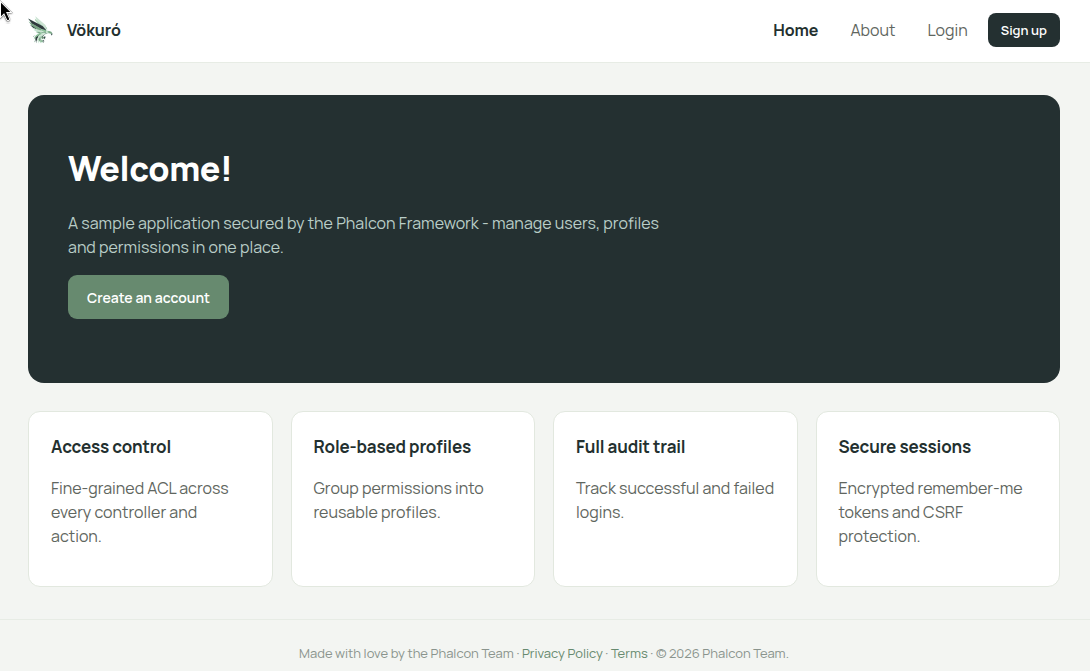
Once the configuration is in place, visiting the address will present a screen similar to this:
Structure
Vökuró follows the PDS skeleton layout. The application source lives under src, the views under themes, and all tooling configuration under resources:
vokuro/
    config
    docs
    public
        css
        img
        js
    resources
        docker
        migrations
        seeds
    src
        Controllers
        Forms
        Models
        Plugins
        Providers
    tests
        Browser
        Functional
        Support
        Unit
    themes
        vokuro
    var
| Directory | Description |
|---|---|
config |
Application configuration (ACL, config, providers, routes) |
docs |
Documentation |
public |
Entry point for the application, css, js, images |
resources |
Tooling configuration, Docker, Phinx, migrations, seeds |
resources/docker |
Dockerfile and related build files |
resources/migrations |
Phinx database migrations |
resources/seeds |
Phinx database seeders |
src |
Where the application lives (controllers, forms, etc.) |
src/Controllers |
Controllers |
src/Forms |
Forms |
src/Models |
Database models |
src/Plugins |
Plugins (ACL, Auth, Mail) |
src/Providers |
Providers: register services in the DI container |
tests |
PHPUnit suites (unit, functional, browser) |
themes |
Themes/views for customization |
themes/vokuro |
Default theme for the application |
var |
Runtime cache and logs |
Configuration
.env
Vökuró uses the Dotenv library by Vance Lucas. The library reads a .env file in the project root, which holds configuration parameters such as the database host, username, and password. A resources/.env.example file ships with the application. Copy it to .env and edit it to match your environment. The create-project hook performs this copy for you.
The available options are:
| Option | Description |
|---|---|
PROJECT_PREFIX |
Prefix for the Docker container and Compose project names. Defaults to vokuro. |
APP_PORT |
Host port mapped to the container's port 8080. Defaults to 8080. |
MAILPIT_HTTP |
Host port for the Mailpit web UI. Defaults to 8025. |
UID / GID |
Host user and group id used inside the container. Override to match your host user if it is not 1000:1000. |
APP_CRYPT_SALT |
Random, long string used by the Phalcon\Encryption\Crypt component to produce passwords and other security features. |
APP_BASE_URI |
Usually / if the web server points directly to the Vökuró directory. Adjust it if you install Vökuró in a subdirectory. |
APP_PUBLIC_URL |
The public URL of the application. Used in the e-mails. |
DB_ADAPTER |
The database adapter. Available adapters are mysql, pgsql, and sqlite. Ensure the relevant PDO extension is installed. |
DB_HOST |
The database host. In Docker this is the mysql service name. On a local host it is usually 127.0.0.1. |
DB_PORT |
The database port. |
DB_USERNAME |
The database username. |
DB_PASSWORD |
The database password. |
DB_NAME |
The database name. |
MAIL_FROM_NAME |
The FROM name for outgoing e-mail. |
MAIL_FROM_EMAIL |
The FROM address for outgoing e-mail. |
MAIL_SMTP_SERVER |
The SMTP server. In Docker this is the mailpit service name. |
MAIL_SMTP_PORT |
The SMTP port. Mailpit listens on 1025. |
MAIL_SMTP_SECURITY |
The SMTP security, for example tls. Empty for Mailpit. |
MAIL_SMTP_USERNAME |
The SMTP username. Empty for Mailpit. |
MAIL_SMTP_PASSWORD |
The SMTP password. Empty for Mailpit. |
Database
Vökuró uses Phinx for migrations and seeding. Phinx reads its own configuration file, resources/phinx.php, which in turn reads the .env file. You do not need to edit phinx.php. All database settings live in .env.
Migrations and seeders are wrapped in Composer scripts. To create the schema and load the sample data:
Inside the Docker stack, run them through the container:
Migrations are not run on container boot. They are decoupled so you control when the schema changes.
Config files
The config/ folder holds four files. You do not need to change them to start the application, but this is where you customize behavior.
acl.php
Returns an array of private resources, keyed by controller with an array of actions. These controller/action pairs require an authenticated user:
<?php

declare(strict_types=1);

return [
    'private' => [
        'users' => [
            'index',
            'search',
            'edit',
            'create',
            'delete',
            'changePassword',
        ],
        'profiles' => [
            'index',
            'search',
            'edit',
            'create',
            'delete',
        ],
        'permissions' => [
            'index',
        ],
    ],
];
If you use Vökuró as a starting point, modify this file to add or remove the routes that must sit behind the login mechanism.
NOTE
Keeping the private routes in an array is efficient and easy to maintain for a small to medium application. Once your application grows, consider a different technique such as a database with a caching mechanism.
config.php
Holds the configuration parameters that Vökuró needs. Most values are populated from .env through Dotenv, so you rarely change this file. It also defines the log, view, cache, and session paths.
One value to note is useMail. Set it to false to stop Vökuró from connecting to a mail server when a user registers. This is useful on a local machine or in a test environment.
providers.php
Contains the list of provider classes that Vökuró registers in the DI container. Add a class here to register a new service. Remove or comment out a class to disable one.
routes.php
Contains the application-specific routes. The router already registers the default route, so this file only defines non-standard routes. Vökuró registers two:
<?php

declare(strict_types=1);

use Phalcon\Mvc\Router;

/**
 * @var Router $router
 */

$router->add('/confirm/{code}/{email}', [
    'controller' => 'user_control',
    'action'     => 'confirmEmail',
]);

$router->add('/reset-password/{code}/{email}', [
    'controller' => 'user_control',
    'action'     => 'resetPassword',
]);
The default route remains:
Providers
Vökuró uses classes called Providers to register services in the DI container. This is one way to register services. Nothing stops you from putting all registrations in a single file.
Vökuró uses one file per service, plus a config/providers.php array that lists the classes to register. This keeps each service in a small, separate file, and lets you register or disable a service by editing the array without deleting files.
The provider classes are in src/Providers. Each one implements the Phalcon\Di\ServiceProviderInterface interface. See the bootstrapping section below.
Two of the providers wire up the debug bar. EventsManagerProvider registers a single events manager as a shared service, and DbProvider, ViewProvider, RouterProvider, and DispatcherProvider hand it to their components so the bar's streamed collectors receive their events. DebugBarProvider then boots the bar against the application. The bar runs in development only, gated by APP_ENV.
Composer
Vökuró uses Composer to install its PHP dependencies. The runtime dependencies are:
"require": {
    "php": ">=8.1",
    "ext-openssl": "*",
    "phalcon/debugbar": "^0.1.0",
    "robmorgan/phinx": "^0.16",
    "symfony/mailer": "^6.4",
    "vlucas/phpdotenv": "^5.6"
}
The Phalcon extension is not a hard requirement. It is listed under suggest, because the application can run on the phalcon/phalcon (v6) package that is pulled in as a development dependency. For a fresh install:
To upgrade existing packages:
The composer.json autoload entry maps the Vokuro namespace to the src folder and loads the helper functions:
Composer scripts
Vökuró defines Composer scripts for quality checks, tests, and the database. Run them on the host, or inside the container with docker compose exec app composer <script>:
| Script | Description |
|---|---|
composer cs |
PHP_CodeSniffer (PSR-12) |
composer cs-fix |
Auto-fix coding standard issues (phpcbf) |
composer cs-fixer |
PHP CS Fixer (dry run) |
composer cs-fixer-fix |
Apply PHP CS Fixer |
composer analyze |
PHPStan static analysis (run where the v5 extension is not loaded) |
composer test |
PHPUnit suites (unit, functional, browser) via talon |
composer test-coverage |
PHPUnit plus Clover coverage in tests/_output/coverage.xml |
composer migrate |
Run the database migrations (Phinx) |
composer seed |
Seed the database |
NOTE
composer analyze resolves Phalcon classes from the phalcon/phalcon (v6) source, so run it where the v5 C extension is not loaded, such as the CI quality job or a plain host.
Bootstrapping
Entry
The entry point is public/index.php. It bootstraps and runs the application, and serves as the single point of entry, which makes it easier to trap errors and protect files.
<?php

use Vokuro\Application as VokuroApplication;

error_reporting(E_ALL);
$rootPath = dirname(__DIR__);

try {
    require_once $rootPath . '/vendor/autoload.php';

    /**
     * Load .env configuration
     */
    Dotenv\Dotenv::createUnsafeImmutable($rootPath)->safeLoad();

    /**
     * Run Vökuró
     */
    echo (new VokuroApplication($rootPath))->run();
} catch (Exception $e) {
    echo $e->getMessage(), '<br>';
    echo nl2br(htmlentities($e->getTraceAsString()));
}
First, the file enables full error reporting. You can change this, or move the setting into your .env file.
A try/catch block wraps all operations, so errors are caught and displayed on screen.
DANGER
This is tutorial code, not a production application. If a database error occurs, the catch block echoes the exception, which can contain the database credentials. Rework this code before deploying.
The composer autoloader is loaded so the supporting libraries and the Vokuro namespaced classes are available. The environment variables from .env are then loaded with createUnsafeImmutable($rootPath)->safeLoad(). Finally, the application runs.
Requests are routed through .htrouter.php when you use the built-in PHP web server. It serves existing files from public directly and forwards everything else to public/index.php:
<?php

$uri = urldecode(
    parse_url($_SERVER['REQUEST_URI'], PHP_URL_PATH)
);

if ($uri !== '/' && file_exists(__DIR__ . '/public' . $uri)) {
    return false;
}

$_GET['_url'] = $_SERVER['REQUEST_URI'];

require_once __DIR__ . '/public/index.php';
Application
All the application logic is wrapped in the Vokuro\Application class:
<?php

declare(strict_types=1);

namespace Vokuro;

use Phalcon\Di\DiInterface;
use Phalcon\Di\FactoryDefault;
use Phalcon\Di\ServiceProviderInterface;
use Phalcon\Http\ResponseInterface;
use Phalcon\Mvc\Application as MvcApplication;

class Application
{
    public const APPLICATION_PROVIDER = 'bootstrap';

    /**
     * @var MvcApplication
     */
    protected $app;

    /**
     * @var DiInterface
     */
    protected $di;

    /**
     * @var string
     */
    protected $rootPath;

    /**
     * @param string $rootPath
     *
     * @throws Exception
     */
    public function __construct(string $rootPath)
    {
        $this->di       = new FactoryDefault();
        $this->app      = $this->createApplication();
        $this->rootPath = $rootPath;

        $this->di->setShared(self::APPLICATION_PROVIDER, $this);

        $this->initializeProviders();
    }

    /**
     * @return string
     */
    public function getRootPath(): string
    {
        return $this->rootPath;
    }

    /**
     * @return string
     * @throws Exception
     */
    public function run(): string
    {
        $baseUri  = $this->di->getShared('url')->getBaseUri();
        $position = strpos($_SERVER['REQUEST_URI'], $baseUri) + strlen($baseUri);
        $uri      = '/' . substr($_SERVER['REQUEST_URI'], $position);

        /** @var ResponseInterface $response */
        $response = $this->app->handle($uri);

        return (string) $response->getContent();
    }

    /**
     * @return MvcApplication
     */
    protected function createApplication(): MvcApplication
    {
        return new MvcApplication($this->di);
    }

    /**
     * @throws Exception
     */
    protected function initializeProviders(): void
    {
        $filename = $this->rootPath . '/config/providers.php';
        if (!file_exists($filename) || !is_readable($filename)) {
            throw new Exception(
                'File providers.php does not exist or is not readable.'
            );
        }

        $providers = require $filename;
        foreach ($providers as $providerClass) {
            /** @var ServiceProviderInterface $provider */
            $provider = new $providerClass();
            $provider->register($this->di);
        }
    }
}
The constructor creates a Phalcon\Di\FactoryDefault container, which has many services already registered. It then creates a Phalcon\Mvc\Application and stores the root path.
The class registers itself in the DI container under the name bootstrap, so the application is reachable from anywhere through the container.
The constructor then registers the providers. It reads config/providers.php, loops through the class names, and calls register() on each with the DI container. Each provider implements the Phalcon\Di\ServiceProviderInterface interface.
The available providers are:
| Provider | Description |
|---|---|
AclProvider |
Permissions |
AssetsProvider |
CSS and JavaScript assets |
AuthProvider |
Authentication |
ConfigProvider |
Configuration values |
CryptProvider |
Encryption |
DbProvider |
Database access |
DispatcherProvider |
Dispatcher - which controller to call for a URL |
FlashProvider |
Flash messages for feedback to the user |
LoggerProvider |
Logger for errors and other information |
MailProvider |
Mail support |
ModelsMetadataProvider |
Metadata for models |
RouterProvider |
Routes |
SecurityProvider |
Security |
SessionBagProvider |
Session data |
SessionProvider |
Session |
UrlProvider |
URL handling |
ViewProvider |
Views and view engine |
run() computes the request URI relative to the configured base URI, hands it to the application, and returns the content. Internally the application calculates the route, dispatches the controller and view, and returns the response.
Database
Vökuró can be installed with MariaDB/MySQL/Aurora, PostgreSQL, or SQLite. For this tutorial, we use MySQL. The tables the application uses are:
| Table | Description |
|---|---|
email_confirmations |
Email confirmations for registration |
failed_logins |
Failed login attempts |
password_changes |
When a password was changed and by whom |
permissions |
Permission matrix |
phinxlog |
Phinx migration log |
profiles |
Profile for each user |
remember_tokens |
Remember Me functionality tokens |
reset_passwords |
Reset password tokens |
success_logins |
Successful login attempts |
users |
Users |
Models
Following the Model-View-Controller pattern, Vökuró has one model per database table (excluding phinxlog). The models let you interact with the tables in an object-oriented manner. They live in src/Models. Each model defines its fields, source table, and any relationships. Some models also define validation rules.
<?php

declare(strict_types=1);

namespace Vokuro\Models;

use Phalcon\Mvc\Model;

class SuccessLogins extends Model
{
    /**
     * @var integer
     */
    public $id;

    /**
     * @var integer
     */
    public $usersId;

    /**
     * @var string
     */
    public $ipAddress;

    /**
     * @var string
     */
    public $userAgent;

    public function initialize()
    {
        $this->belongsTo(
            'usersId',
            Users::class,
            'id',
            [
                'alias' => 'user',
            ]
        );
    }
}
In the model above, all the table fields are declared as public properties for direct access:
WARNING
The property names match the case (upper/lower) of the field names in the table.
In initialize(), the model defines a relationship to the Users model, with local and remote fields and an alias. The related user is then reachable through the alias:
NOTE
Open each model file to see the relationships between the models. Check the documentation for the difference between the various types of relationships.
Controllers
Following the Model-View-Controller pattern, Vökuró has one controller per parent route. The AboutController handles the /about route. All controllers live in src/Controllers.
The default controller is IndexController. Controller classes carry the Controller suffix. Actions carry the Action suffix, and the default action is indexAction. Visiting the site at the root URL calls IndexController and runs indexAction.
Unless you register specific routes, the default route maps:
to
The available controllers, actions, and routes for Vökuró are:
| Controller | Action | Route | Description |
|---|---|---|---|
About |
index |
/about |
Shows the about page |
Index |
index |
/ |
Default action - home page |
Permissions |
index |
/permissions |
View/change permissions for a profile level |
Privacy |
index |
/privacy |
View the privacy page |
Profiles |
index |
/profiles |
View profiles default page |
Profiles |
create |
/profiles/create |
Create profile |
Profiles |
delete |
/profiles/delete |
Delete profile |
Profiles |
edit |
/profiles/edit |
Edit profile |
Profiles |
search |
/profiles/search |
Search profiles |
Session |
index |
/session |
Session default action |
Session |
forgotPassword |
/session/forgotPassword |
Forgot password |
Session |
login |
/session/login |
Login |
Session |
logout |
/session/logout |
Logout |
Session |
signup |
/session/signup |
Signup |
Terms |
index |
/terms |
View the terms page |
UserControl |
confirmEmail |
/confirm |
Confirm email |
UserControl |
resetPassword |
/reset-password |
Reset password |
Users |
index |
/users |
Users default screen |
Users |
changePassword |
/users/changePassword |
Change user password |
Users |
create |
/users/create |
Create user |
Users |
delete |
/users/delete |
Delete user |
Users |
edit |
/users/edit |
Edit user |
Views
The last element of the Model-View-Controller pattern is the views. Vökuró uses Volt as the view engine.
NOTE
You would normally expect a views folder under src. Vökuró stores all view files under themes/vokuro instead.
The views directory contains one directory per controller. Inside each, .volt files map to each action. The route:
maps to:
and the view is:
The available views are:
| Controller | Action | View | Description |
|---|---|---|---|
About |
index |
/about/index.volt |
Shows the about page |
Index |
index |
/index/index.volt |
Default action - home page |
Permissions |
index |
/permissions/index.volt |
View/change permissions for a profile level |
Privacy |
index |
/privacy/index.volt |
View the privacy page |
Profiles |
index |
/profiles/index.volt |
View profiles default page |
Profiles |
create |
/profiles/create.volt |
Create profile |
Profiles |
delete |
/profiles/delete.volt |
Delete profile |
Profiles |
edit |
/profiles/edit.volt |
Edit profile |
Profiles |
search |
/profiles/search.volt |
Search profiles |
Session |
index |
/session/index.volt |
Session default action |
Session |
forgotPassword |
/session/forgotPassword.volt |
Forgot password |
Session |
login |
/session/login.volt |
Login |
Session |
logout |
/session/logout.volt |
Logout |
Session |
signup |
/session/signup.volt |
Signup |
Terms |
index |
/terms/index.volt |
View the terms page |
Users |
index |
/users/index.volt |
Users default screen |
Users |
changePassword |
/users/changePassword.volt |
Change user password |
Users |
create |
/users/create.volt |
Create user |
Users |
delete |
/users/delete.volt |
Delete user |
Users |
edit |
/users/edit.volt |
Edit user |
The index.volt file contains the main layout of the page, including stylesheet and JavaScript references. The layouts directory contains layouts used across the application, for instance a public one for anonymous users and a private one for logged-in users. Individual views are injected into the layouts to form the final page.
Components
Vökuró uses several components that provide functionality across the application. They live in src/Plugins.
Acl
Vokuro\Plugins\Acl\Acl implements an Access Control List for the application. The ACL controls which user has access to which resource. See the ACL page for details.
The component reads the private resources from config/acl.php, the controller/action pairs that require authentication. It also holds human-readable descriptions for the actions used throughout the application.
The component exposes the following methods:
| Method | Returns | Description |
|---|---|---|
addPrivateResources(array $resources) |
void |
Adds private resources to the ACL |
getAcl() |
AclMemory |
Returns the ACL list |
getActionDescription($action) |
string |
Returns the action description from its simplified name |
getPermissions(Profiles $profile) |
array |
Returns the permissions assigned to a profile |
getResources() |
array |
Returns all the resources and their actions |
isAllowed($profile, $controller, $action) |
bool |
Checks whether the profile is allowed to access a resource |
isPrivate($controllerName) |
bool |
Checks whether a controller is private |
rebuild() |
AclMemory |
Rebuilds the access list into a file |
Auth
Vokuro\Plugins\Auth\Auth manages authentication and identity in Vökuró.
The component exposes the following methods:
| Method | Description |
|---|---|
authUserById($id) |
Authenticates the user by id |
check($credentials) |
Checks the user credentials |
checkUserFlags(Users $user) |
Checks whether the user is banned, inactive, or suspended |
createRememberEnvironment(Users $user) |
Creates the Remember Me cookies and tokens |
deleteToken(int $userId) |
Deletes the current user token in the session |
findFirstByToken($token) |
Returns the user for the current token |
getIdentity() |
Returns the current identity |
getName() |
Returns the name of the user |
getUser() |
Returns the entity related to the active identity |
hasRememberMe() |
Checks whether the session has a Remember Me cookie |
loginWithRememberMe() |
Logs in using the information in the cookies |
registerUserThrottling($userId) |
Implements login throttling to reduce the effectiveness of brute-force attacks |
remove() |
Removes the user identity from the session |
saveSuccessLogin($user) |
Records a successful login |
Mail
Vokuro\Plugins\Mail\Mail is a wrapper around Symfony Mailer. It exposes buildMessage(), getTemplate(), and send(). getTemplate() reads a template from the views and populates it with data. buildMessage() assembles a Symfony\Component\Mime\Email from its arguments. send() renders a template and sends the message.
| Method | Returns | Description |
|---|---|---|
buildMessage($to, $subject, $html, $from, $name) |
Email |
Builds the message. All inputs are passed in, nothing is read from the container |
getTemplate($name, $params) |
string |
Renders a view template with the supplied parameters |
send($to, $subject, $name, $params) |
int |
Renders a template and sends the message |
NOTE
This component is used only when useMail is enabled in config/config.php. In Docker, e-mails are delivered to the Mailpit catcher and never leave the host. Its web UI is at http://localhost:8025.
Sign Up
Controller
To access all the areas of Vökuró you need an account. Vökuró lets you sign up by clicking the Create an Account button.
This navigates to /session/signup, which calls SessionController and signupAction:
<?php

declare(strict_types=1);

namespace Vokuro\Controllers;

use Phalcon\Flash\Direct;
use Phalcon\Http\Request;
use Phalcon\Mvc\Dispatcher;
use Phalcon\Mvc\View;
use Phalcon\Encryption\Security;
use Vokuro\Forms\SignUpForm;
use Vokuro\Models\Users;

/**
 * @property Dispatcher $dispatcher
 * @property Direct     $flash
 * @property Request    $request
 * @property Security   $security
 * @property View       $view
 */
class SessionController extends ControllerBase
{
    public function signupAction()
    {
        $form = new SignUpForm();

        // ....

        $this->view->setVar('form', $form);
    }
}
The workflow of the application is:
- Visit
/session/signup- Create form, send form to the view, render the form
- Submit data (not post)
- Form shows again, nothing else happens
- Submit data (post)
- Errors
- Form validators have errors, send the form to the view, render the form (errors show)
- No errors
- Data is sanitized
- New model created
- Data saved in the database
- Error
- Show the message and refresh the form
- Success
- Record saved
- Show confirmation
- Send email (if applicable)
- Error
- Errors
Form
To validate user-supplied data, Vökuró uses Phalcon\Forms\Form and the Phalcon\Filter\Validation classes. These create HTML elements and attach validators. The form is passed to the view, which renders the HTML elements. When the user submits data, the posted data is passed back to the form, and the validators return any error messages.
NOTE
All forms for Vökuró are in src/Forms.
The SignUpForm object defines every HTML element with its validators:
<?php

declare(strict_types=1);

namespace Vokuro\Forms;

use Phalcon\Filter\Validation\Validator\Confirmation;
use Phalcon\Filter\Validation\Validator\Email;
use Phalcon\Filter\Validation\Validator\Identical;
use Phalcon\Filter\Validation\Validator\PresenceOf;
use Phalcon\Filter\Validation\Validator\StringLength;
use Phalcon\Forms\Element\Check;
use Phalcon\Forms\Element\Hidden;
use Phalcon\Forms\Element\Password;
use Phalcon\Forms\Element\Submit;
use Phalcon\Forms\Element\Text;
use Phalcon\Forms\Form;

class SignUpForm extends Form
{
    /**
     * @param mixed $entity
     * @param array $options
     */
    public function initialize($entity = null, array $options = [])
    {
        $name = new Text('name');
        $name->setLabel('Name');
        $name->addValidators(
            [
                new PresenceOf(
                    [
                        'message' => 'The name is required',
                    ]
                ),
            ]
        );

        $this->add($name);

        $email = new Text('email');
        $email->setLabel('E-Mail');
        $email->addValidators(
            [
                new PresenceOf(
                    [
                        'message' => 'The e-mail is required',
                    ]
                ),
                new Email(
                    [
                        'message' => 'The e-mail is not valid',
                    ]
                ),
            ]
        );

        $this->add($email);

        $password = new Password('password');
        $password->setLabel('Password');
        $password->addValidators(
            [
                new PresenceOf(
                    [
                        'message' => 'The password is required',
                    ]
                ),
                new StringLength(
                    [
                        'min'            => 8,
                        'included'       => true,
                        'messageMinimum' => 'Password is too short. ' .
                                            'Minimum 8 characters',
                    ]
                ),
                new Confirmation(
                    [
                        'message' => "Password doesn't match " .
                                     "confirmation",
                        'with'    => 'confirmPassword',
                    ]
                ),
            ]
        );

        $this->add($password);

        $confirmPassword = new Password('confirmPassword');
        $confirmPassword->setLabel('Confirm Password');
        $confirmPassword->addValidators(
            [
                new PresenceOf(
                    [
                        'message' => 'The confirmation password ' .
                                     'is required',
                    ]
                ),
            ]
        );

        $this->add($confirmPassword);

        $terms = new Check(
            'terms',
            [
                'value' => 'yes',
            ]
        );

        $terms->setLabel('Accept terms and conditions');
        $terms->addValidator(
            new Identical(
                [
                    'value'   => 'yes',
                    'message' => 'Terms and conditions must be ' .
                                 'accepted',
                ]
            )
        );

        $this->add($terms);

        $csrf = new Hidden('csrf');
        $csrf->addValidator(
            new Identical(
                [
                    'value'   => $this->security->getRequestToken(),
                    'message' => 'CSRF validation failed',
                ]
            )
        );
        $csrf->clear();

        $this->add($csrf);

        $this->add(
            new Submit(
                'Sign Up',
                [
                    'class' => 'btn btn-success',
                ]
            )
        );
    }

    /**
     * @param string $name
     *
     * @return string
     */
    public function messages(string $name)
    {
        if ($this->hasMessagesFor($name)) {
            foreach ($this->getMessagesFor($name) as $message) {
                return $message;
            }
        }

        return '';
    }
}
In initialize() the form sets up all the HTML elements:
| Element | Type | Description |
|---|---|---|
name |
Text |
The name of the user |
email |
Text |
The email for the account |
password |
Password |
The password for the account |
confirmPassword |
Password |
Password confirmation |
terms |
Check |
Accept the terms checkbox |
csrf |
Hidden |
CSRF protection element |
Sign Up |
Submit |
Submit button |
Adding an element is straightforward:
<?php

declare(strict_types=1);

use Phalcon\Filter\Validation\Validator\Email;
use Phalcon\Filter\Validation\Validator\PresenceOf;
use Phalcon\Forms\Element\Text;

$email = new Text('email');
$email->setLabel('E-Mail');
$email->addValidators(
    [
        new PresenceOf(
            [
                'message' => 'The e-mail is required',
            ]
        ),
        new Email(
            [
                'message' => 'The e-mail is not valid',
            ]
        ),
    ]
);

$this->add($email);
First, a Text object is created with the name email and the label E-Mail. Validators are then attached. They are invoked after the user submits the data.
The PresenceOf validator produces the message The e-mail is required when the field is empty. It checks the passed array (usually $_POST), in this case $_POST['email']. The Email validator checks for a valid address. Validators belong in an array, so you attach as many as you need to any element. The last step adds the element to the form.
The terms element has an Identical validator that requires the checkbox value to equal yes.
The password and confirmPassword elements are both of type Password. The user must type the password twice, and the two must match. The password field has a PresenceOf validator (it is required) and a StringLength validator (at least 8 characters). It also has a Confirmation validator that ties password to confirmPassword. When it runs, it compares both elements. If they differ, validation fails.
View
The form is passed to the view:
The view renders the elements:
{# ... #}
{%
set isEmailValidClass = form.messages('email') ?
'form-control is-invalid' :
'form-control'
%}
{# ... #}
<h1 class="mt-3">Sign Up</h1>
<form method="post">
{# ... #}
<div class="form-group row">
{{
form.label(
'email',
[
'class': 'col-sm-2 col-form-label'
]
)
}}
<div class="col-sm-10">
{{
form.render(
'email',
[
'class': isEmailValidClass,
'placeholder': 'Email'
]
)
}}
<div class="invalid-feedback">
{{ form.messages('email') }}
</div>
</div>
</div>
{# ... #}
<div class="form-group row">
<div class="col-sm-10">
{{
form.render(
'csrf',
[
'value': security.getToken()
]
)
}}
{{ form.messages('csrf') }}
{{ form.render('Sign Up') }}
</div>
</div>
</form>
<hr>
{{ link_to('session/login', "← Back to Login") }}
The view variable for the SignUpForm object is form. In PHP you call $form->render(); in Volt you call form.render().
The conditional at the top checks whether the form has errors, and if so attaches the is-invalid CSS class to the element. This class adds a red border and shows the message.
To render each element, call render() on form with the element name. form.label() with the same name creates the <label> tag. At the end, the view renders the csrf hidden field and the Sign Up submit button.
Post
When the user fills out the form and clicks Sign Up, the form self-posts to the same controller and action (/session/signup). The action processes the posted data:
<?php

declare(strict_types=1);

namespace Vokuro\Controllers;

use Phalcon\Flash\Direct;
use Phalcon\Http\Request;
use Phalcon\Mvc\Dispatcher;
use Phalcon\Mvc\View;
use Phalcon\Encryption\Security;
use Vokuro\Forms\SignUpForm;
use Vokuro\Models\Users;

/**
 * @property Dispatcher $dispatcher
 * @property Direct     $flash
 * @property Request    $request
 * @property Security   $security
 * @property View       $view
 */
class SessionController extends ControllerBase
{
    public function signupAction()
    {
        $form = new SignUpForm();

        if (true === $this->request->isPost()) {
            if (false !== $form->isValid($this->request->getPost())) {
                $name     = $this
                    ->request
                    ->getPost('name', 'striptags')
                ;
                $email    = $this
                    ->request
                    ->getPost('email')
                ;
                $password = $this
                    ->request
                    ->getPost('password')
                ;
                $password = $this
                    ->security
                    ->hash($password)
                ;

                $user = new Users(
                    [
                        'name'       => $name,
                        'email'      => $email,
                        'password'   => $password,
                        'profilesId' => 2,
                    ]
                );

                if ($user->save()) {
                    $this->dispatcher->forward([
                        'controller' => 'index',
                        'action'     => 'index',
                    ]);
                }

                foreach ($user->getMessages() as $message) {
                    $this->flash->error((string) $message);
                }
            }
        }

        $this->view->setVar('form', $form);
    }
}
If the user submitted data, the following evaluates true, and the code inside the if runs:
The Phalcon\Http\Request object returns the posted data:
The posted data is passed to the form and validated with isValid(). This fires every validator. If any fail, the form collects the messages and returns false:
If the data is valid, the Phalcon\Http\Request object retrieves and sanitizes each value. The example below strips tags from the name string:
Clear-text passwords are never stored. The Phalcon\Encryption\Security component hashes the password into a one-way hash, and that is stored instead:
The sanitized data is stored by creating a Users model, passing the data, and calling save():
$user = new Users(
    [
        'name'       => $name,
        'email'      => $email,
        'password'   => $password,
        'profilesId' => 2,
    ]
);

if ($user->save()) {
    $this
        ->dispatcher
        ->forward(
            [
                'controller' => 'index',
                'action'     => 'index',
            ]
        );
}
If $user->save() returns true, the user is forwarded to the home page (index/index) and a success message appears.
Model
Relationships
The Users model applies logic in the afterSave and beforeValidationOnCreate events. The setup happens in initialize(), where the relationships are defined.
To check all the successful logins for a user, you could query both tables directly:
<?php

declare(strict_types=1);

use Vokuro\Models\SuccessLogins;
use Vokuro\Models\Users;

$user = Users::findFirst(
    [
        'conditions' => 'id = :id:',
        'bind'       => [
            'id' => 7,
        ],
    ]
);

$logins = SuccessLogins::find(
    [
        'conditions' => 'usersId = :usersId:',
        'bind'       => [
            'usersId' => 7,
        ],
    ]
);
With a relationship, Phalcon does the join for you:
<?php

declare(strict_types=1);

use Vokuro\Models\Users;

$user = Users::findFirst(
    [
        'conditions' => 'id = :id:',
        'bind'       => [
            'id' => 7,
        ],
    ]
);

$logins = $user->successLogins;

$logins = $user->getRelated('successLogins');
The last two lines do the same thing. Phalcon queries the related table, filtered by the user id.
For the Users table, Vökuró defines these relationships:
| Name | Source field | Target field | Model |
|---|---|---|---|
passwordChanges |
id |
usersId |
PasswordChanges |
profile |
profilesId |
id |
Profiles |
resetPasswords |
id |
usersId |
ResetPasswords |
successLogins |
id |
usersId |
SuccessLogins |
<?php

declare(strict_types=1);

namespace Vokuro\Models;

use Phalcon\Mvc\Model;

class Users extends Model
{
    // ...

    public function initialize()
    {
        $this->belongsTo(
            'profilesId',
            Profiles::class,
            'id',
            [
                'alias'    => 'profile',
                'reusable' => true,
            ]
        );

        $this->hasMany(
            'id',
            SuccessLogins::class,
            'usersId',
            [
                'alias'      => 'successLogins',
                'foreignKey' => [
                    'message' => 'User cannot be deleted because ' .
                                 'he/she has activity in the system',
                ],
            ]
        );

        $this->hasMany(
            'id',
            PasswordChanges::class,
            'usersId',
            [
                'alias'      => 'passwordChanges',
                'foreignKey' => [
                    'message' => 'User cannot be deleted because ' .
                                 'he/she has activity in the system',
                ],
            ]
        );

        $this->hasMany(
            'id',
            ResetPasswords::class,
            'usersId',
            [
                'alias'      => 'resetPasswords',
                'foreignKey' => [
                    'message' => 'User cannot be deleted because ' .
                                 'he/she has activity in the system',
                ],
            ]
        );
    }

    // ...
}
There is one belongsTo and three hasMany relationships. Each has an alias for easier access. The belongsTo relationship also sets reusable to on. When the relationship is called more than once in the same request, Phalcon runs the query only the first time and caches the result set. Subsequent calls use the cache.
The relationships also define foreign-key messages. If a relationship is violated, the defined message is raised.
Events
Phalcon\Mvc\Model fires specific events. These methods can live in a listener or in the model. The Users model uses afterSave and beforeValidationOnCreate.
<?php

declare(strict_types=1);

namespace Vokuro\Models;

use Phalcon\Mvc\Model;

class Users extends Model
{
    public function beforeValidationOnCreate()
    {
        if (true === empty($this->password)) {
            $tempPassword = preg_replace(
                '/[^a-zA-Z0-9]/',
                '',
                base64_encode(openssl_random_pseudo_bytes(12))
            );

            $this->mustChangePassword = 'Y';

            $this->password = $this->getDI()
                                   ->getSecurity()
                                   ->hash($tempPassword)
            ;
        } else {
            $this->mustChangePassword = 'N';
        }

        if ($this->getDI()->get('config')->useMail) {
            $this->active = 'N';
        } else {
            $this->active = 'Y';
        }

        $this->suspended = 'N';
        $this->banned    = 'N';
    }
}
beforeValidationOnCreate fires on every new record, before validation. If the password is empty, it generates a random string, hashes it with Phalcon\Encryption\Security, and sets the flag to change the password. If the password is set, it sets mustChangePassword to N. It then sets the active, suspended, and banned defaults.
<?php

declare(strict_types=1);

namespace Vokuro\Models;

use Phalcon\Mvc\Model;

class Users extends Model
{
    public function afterSave()
    {
        if ($this->getDI()->get('config')->useMail) {
            if ($this->active == 'N') {
                $emailConfirmation          = new EmailConfirmations();
                $emailConfirmation->usersId = $this->id;

                if ($emailConfirmation->save()) {
                    $this->getDI()
                         ->getFlash()
                         ->notice(
                             'A confirmation mail has ' .
                             'been sent to ' . $this->email
                         )
                    ;
                }
            }
        }
    }
}
afterSave fires right after a record is saved. If e-mail is enabled (useMail in config/config.php) and the user is inactive, it creates and saves an EmailConfirmations record, then shows a notice.
NOTE
The EmailConfirmations model has an afterCreate event that sends the actual e-mail.
Validation
The model's validation() method attaches validators to fields. For Users, the email must be unique, so the Uniqueness validator is attached. It fires before any save, and returns the message if validation fails.
<?php

declare(strict_types=1);

namespace Vokuro\Models;

use Phalcon\Filter\Validation;
use Phalcon\Filter\Validation\Validator\Uniqueness;
use Phalcon\Mvc\Model;

class Users extends Model
{
    public function validation()
    {
        $validator = new Validation();

        $validator->add(
            'email',
            new Uniqueness(
                [
                    'message' => 'The email is already registered',
                ]
            )
        );

        return $this->validate($validator);
    }
}
Conclusion
Vökuró is a sample application that demonstrates features Phalcon offers. It is not a solution that fits all needs. Use it as a starting point for your own application.
References
- Access Control List definition
- Composer
- Dotenv - Vance Lucas
- Model-View-Controller definition
- PDS skeleton
- Phinx - Cake Foundation
- Symfony Mailer
- Mailpit
- PIE - PHP Installer for Extensions
- Talon test runner
- Phalcon ACL
- Phalcon Forms
- Phalcon HTTP Response
- Phalcon Security
- Phalcon Debug Bar
- Vökuró - GitHub Repository
- Phalcon v6 - GitHub Repository